ScienceSoft Global



AI for Radiology
Implementation and Integration for Healthcare Providers
With healthcare IT experience since 2005, ScienceSoft helps healthcare providers implement artificial intelligence for radiology. We integrate AI into existing imaging workflows to identify relevant findings, prioritize urgent studies, and reduce reporting workload while keeping clinical decisions under radiologist control.
Contributors

Senior Solution Architect, Healthcare, ScienceSoft

Head of AI, Principal Architect, ScienceSoft

Senior Healthcare IT & AI Consultant, ScienceSoft
AI in Radiology: Essence
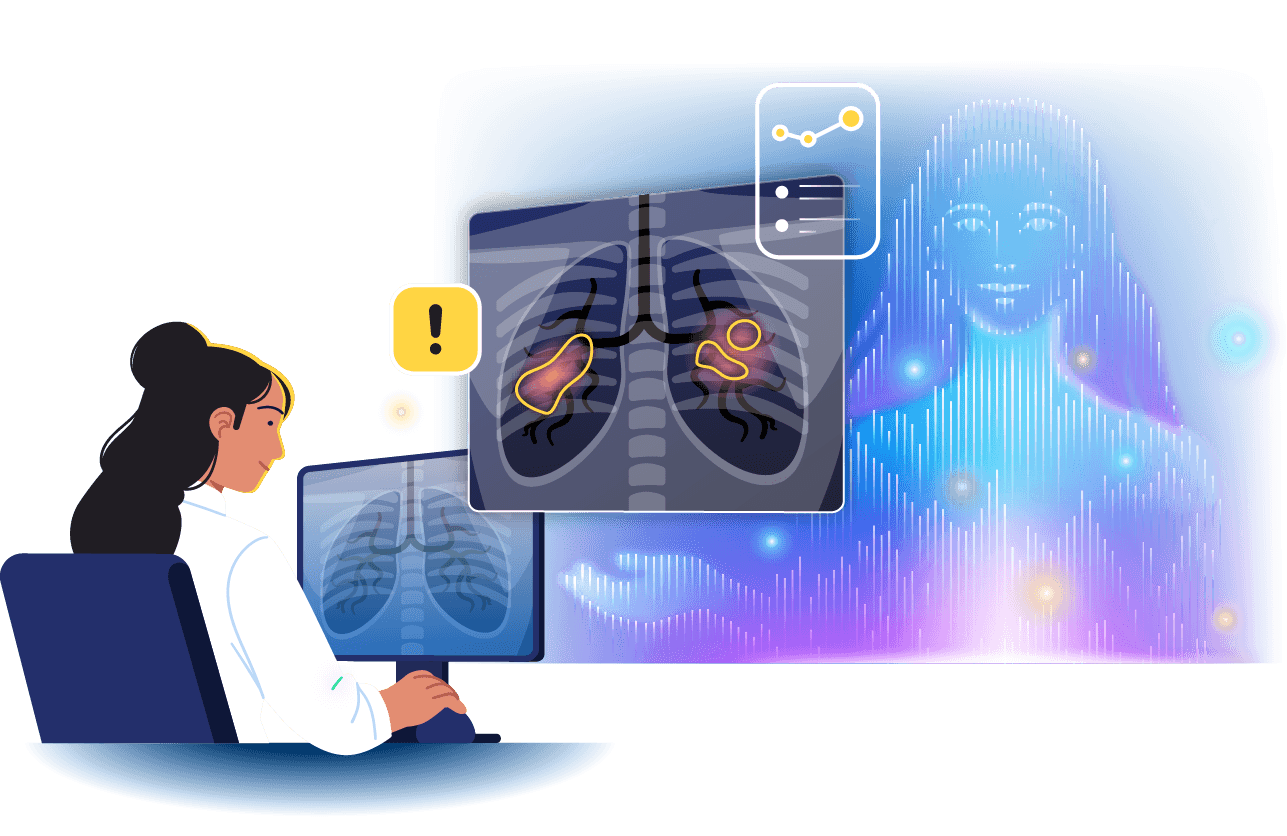
AI in radiology uses machine learning and computer vision to analyze medical images, and NLP and generative AI to support reporting and other text-based workflows. It can help radiologists prioritize urgent studies, detect and quantify findings, compare imaging over time, prepare reports, and organize follow-up while leaving clinical interpretation and final decisions to qualified specialists.
Implementing AI for medical imaging usually doesn’t require replacing existing PACS, RIS, VNA, or EHR. In many cases, providers can add AI solutions as an assistive software layer alongside traditional tools. This layer receives selected studies from existing systems, processes them using approved AI models, and returns results directly to the radiologist's worklist, viewer, or reporting environment.
Where Healthcare Providers Usually Start With Radiology AI
Healthcare providers can introduce radiology AI gradually, starting with one focused workflow and expanding as the value becomes clear.
- Entry level: AI support for one radiology workflow. A hospital or imaging center may start with a custom solution for one mature use case, such as urgent finding prioritization, image segmentation, or AI-assisted reporting. The solution can be integrated into the radiologist’s existing workflow and include the necessary validation, security, and monitoring.
- Mid-scale: AI support across several radiology workflows. A provider may extend AI to several use cases, modalities, or subspecialties. The solution can provide shared integrations, centralized results storage, monitoring, and governance so the different AI capabilities are easier to operate and maintain.
- Enterprise level: centralized radiology AI platform. A multi-site health system, AMC, or large radiology group may need one platform to coordinate AI across multiple workflows, tools, and sites. It can manage study routing, AI processing, result delivery, failover, and monitoring across the organization, making it easier to add or replace AI capabilities without redesigning clinical workflows.
Plan for vendor independence from the start
Whether you begin with a commercial radiology AI product or a custom solution built around a ready AI model, I recommend keeping the AI results and performance history in your own environment. For example, you can record what result was returned, what threshold triggered an alert, how the radiologist responded, and, where available, which product or model version produced the result. This gives you independent evidence for evaluating the AI and preserves that history if you later change vendors.
As your AI environment grows, keep a central record of the AI products and models in use, including their versions, validation results, thresholds, limitations, and deployment status. A model registry can help manage the models you govern directly. If you use several vendor-hosted AI services, a vendor gateway can provide a controlled way to exchange data with them and monitor those connections.
When your AI portfolio becomes too complex to manage vendor by vendor, centralized orchestration can take over study routing, model selection, result handling, and failover. All these measures will help you avoid vendor lock-in and retain the freedom to monitor, compare, and replace AI tools when needed.
Radiology Metrics AI Can Improve

Report turnaround time
Urgent study prioritization and automation of repetitive review tasks can help radiologists reach relevant cases and complete interpretations faster.
Time spent per study
Automated segmentation, measurements, prior study comparison, and reporting assistance can reduce repetitive manual work during image interpretation.
Time to review critical studies
AI-assisted triage can move studies with suspected urgent findings higher in the worklist so they are reviewed sooner.

Radiologist capacity
Reducing time spent on repetitive measurements, documentation, and manual case prioritization can allow the same team to handle imaging volumes more efficiently.
Follow-up completion
AI can identify defined incidental findings and connect them with structured follow-up workflows, provided that clinical ownership and verification processes are already in place.
Consistency of measurements
Automated segmentation and quantitative analysis can support repeatable measurements across serial imaging studies and reduce unnecessary manual variation.
How AI in Radiology Works
Common use cases

Image segmentation
AI-based image segmentation can automatically outline organs, lesions, tumors, or other anatomical structures and incorporate the results directly into the radiologist’s workflow. Radiologists can review and adjust the suggested segmentation, with approved results and corrections captured for further use. The solution can then pass the resulting measurements, annotations, or other outputs to relevant reporting, treatment planning, longitudinal comparison, or downstream clinical workflows and make them available to the appropriate specialists.

Quantitative measurement and longitudinal tracking
AI-based measurement can automate repetitive tasks such as calculating tumor volume, lesion dimensions, or cardiac imaging metrics. The solution can retrieve current and prior studies, present measurements and changes over time in the radiologist’s existing viewer or reporting workflow, and let the radiologist review or correct them. Approved measurements can then flow into reports, follow-up workflows, or other relevant clinical systems.

Urgent finding prioritization
An AI-enabled triage solution can analyze incoming studies in the background and flag potentially time-sensitive findings, such as suspected stroke, pulmonary embolism, or intracranial hemorrhage. Based on configured thresholds and routing rules, the solution can move relevant studies higher in the radiologist’s worklist or trigger an alert for especially urgent cases. The radiologist remains responsible for interpreting the study, while the solution can capture alerts, overrides, and response times for ongoing monitoring.

Incidental finding detection and follow-up support
AI can help identify defined incidental findings, such as lung nodules, adrenal masses, or pancreatic cysts, and present them to the radiologist for verification. Once confirmed, the solution can apply the provider’s follow-up rules, create a due-dated task, notify the appropriate team, or pass the case to care coordination. It can also track whether the recommended follow-up was completed.

AI-assisted reporting
An AI solution can combine imaging findings with relevant patient context, prior reports, provider-approved templates, and reference sources to prepare structured draft content. It can prepopulate measurements, suggest findings for review, and draft selected report sections while checking that required information is present and flagging inconsistencies or unsupported content where appropriate. The radiologist reviews the images and draft, makes any necessary changes, and approves the final report.

AI-assisted screening
In organized high-volume screening programs, an AI-enabled solution can analyze exams in the background and flag studies that may need additional assessment, recall, or specialist attention. For example, in screening mammography, AI results can be surfaced directly in the radiologist’s worklist or viewer and incorporated into the program’s existing review and recall workflow. The radiologist remains responsible for the final decision, while the solution can capture outcomes for monitoring screening performance.
Reference architecture
Below, ScienceSoft’s solution architects show a sample architecture of a radiologist-facing chest X-ray AI assistant. It is most relevant for hospitals, diagnostic imaging centers, and radiology groups that want AI to support both image analysis and report preparation without replacing their existing PACS, RIS, and EHR. The example shows how image analysis models can support study triage, while GenAI helps draft reports. Providers that need only image analysis can use a simpler setup without the GenAI layer.
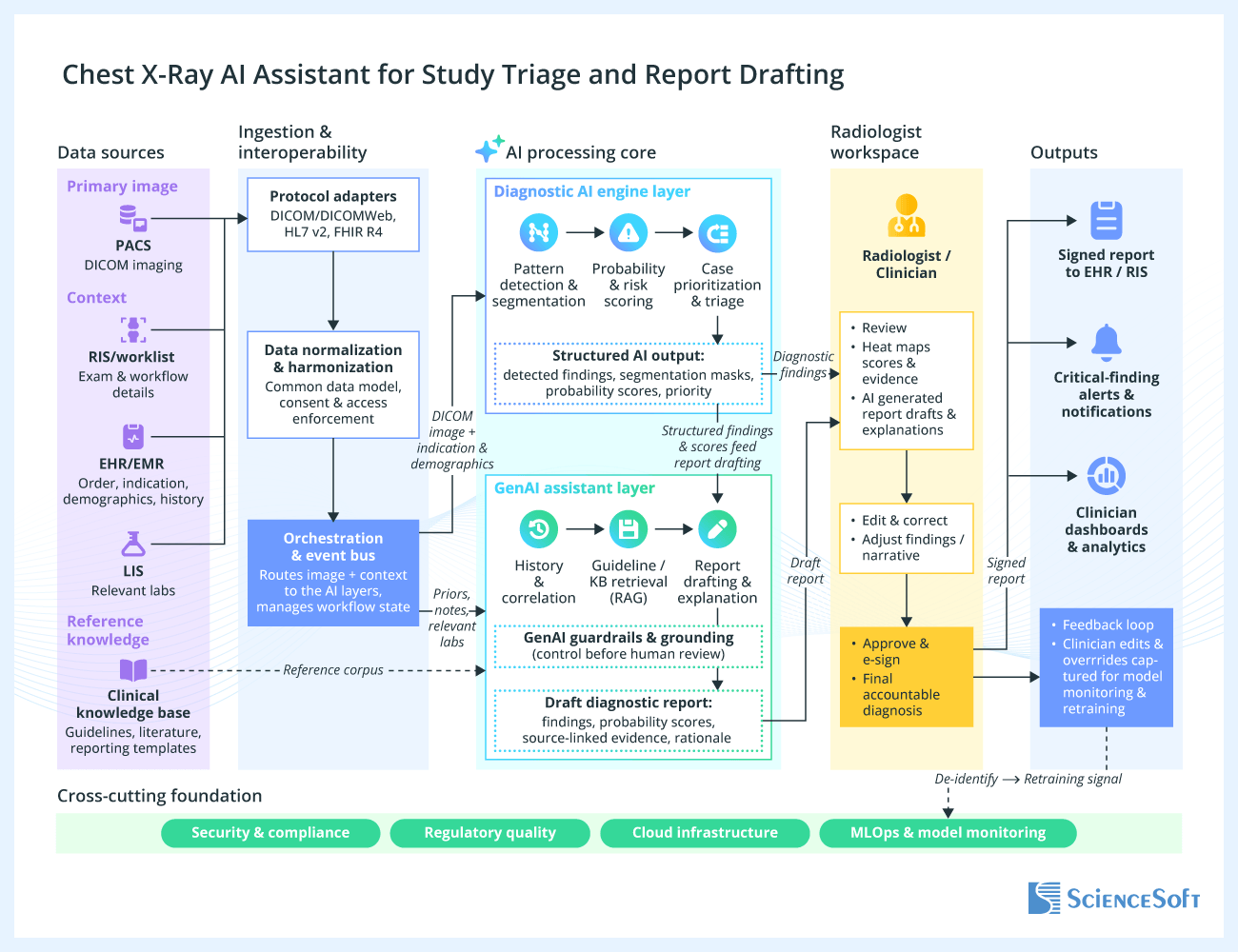
In the proposed architecture, the provider’s PACS, RIS, and EHR send imaging studies and relevant clinical and workflow data to the AI solution’s ingestion layer. The layer prepares the data and routes it to the appropriate AI component. The diagnostic AI engine analyzes the X-rays, flags suspected findings, highlights relevant areas, calculates measurements, and generates triage signals for radiologist review.
The GenAI layer uses diagnostic AI findings along with relevant patient context and prior reports to prepare draft report content. It follows provider-approved reference sources and report templates during the drafting process to prevent free-form notes.
To minimize the risk of errors and hallucinations, different safeguards can be used. For example, source grounding can help prevent fabricated findings, completeness checks can catch missing information, and record comparison can identify contradictions or differences between current and prior studies. The radiologist then reviews the images and AI-generated content, makes any necessary changes, and approves the final report.
Design the workflow around the radiologist, not around the AI tool
AI tends to work best when it is integrated into the tools radiologists already use rather than added as a separate workflow. After deployment, I recommend looking at both clinical performance and workflow impact. Acceptance rates alone do not tell the whole story: periodically reviewing samples of both flagged and unflagged studies can help uncover false positives and missed cases without requiring radiologists to provide feedback on every AI result. It is equally important to check whether the AI is actually helping radiologists work more efficiently. For example, time-to-read can show whether potentially urgent studies are reaching radiologists faster, while alert burden can reveal whether AI is creating too many interruptions or low-value notifications.
Explore AI Opportunities in Radiology With ScienceSoft
ScienceSoft’s consultants and solution architects can assess your current radiology environment and identify areas where implementing AI or strengthening your existing IT infrastructure can measurably improve patient outcomes and business performance. The first consultation is free and comes with no obligation.

Technologies We Use to Implement AI for Radiology
ScienceSoft can help healthcare providers integrate commercial radiology AI products and develop, customize, and scale AI solutions tailored to their specific needs using the following technologies:
Machine learning and computer vision
Frameworks and libraries
- PyTorch
- TensorFlow
- Keras
- MONAI
- OpenCV
- Scikit Learn
- ONNX
- NVIDIA TensorRT
Platforms and services
- Azure Machine Learning
- Amazon SageMaker AI
- Google Vertex AI
MLOps and model serving
- Databricks MLflow
- DVC
- NVIDIA Triton Inference Server
Generative AI
Platforms
- Azure OpenAI
- Amazon Bedrock
- Google Vertex AI
Models
- OpenAI
- Anthropic Claude
- Google Gemini
- MedGemma
- Meta Llama
- Mistral
- Microsoft Phi-3
- Qwen
- Med42
Clinical NLP
- Amazon Comprehend Medical
- Azure Text Analytics for Health
Orchestration
- LangChain
- LangGraph
- LlamaIndex
- Microsoft Agent Framework
Guardrails
- Guardrails AI
- NVIDIA NeMo Guardrails
- Amazon Bedrock Guardrails
- Azure AI Content Safety
- Microsoft Presidio
Evaluation and LLMOps
- RAGAS
- DeepEval
- LangSmith
- Arize Phoenix
Medical imaging and healthcare interoperability
- DICOM
- DICOMweb
- HL7 v2/v3
- FHIR
Cloud infrastructure
- Microsoft Azure
- Amazon Web Services
- Google Cloud Platform
Key Challenges of Implementing AI for Radiology
Challenge #1: Poorly integrated AI can slow radiologists down and create alert fatigue
Solution
We design AI solutions around the existing radiologist workflow. Wherever possible, AI should work in the background, automatically receiving the relevant studies, processing them, and returning results without requiring radiologists to switch tools or interrupt their work. The solution can present findings, measurements, prioritization signals, or draft content directly in the worklist, viewer, or reporting environment; support review and correction; capture user feedback; and route approved results to the appropriate downstream workflows, systems, or clinical roles.
As for alert fatigue, we recommend configuring thresholds and escalation rules so that not every positive model output becomes an urgent alert. For example, after local validation, a provider might set a 60% confidence threshold for an intracranial hemorrhage detection model: suspected hemorrhage at or above that threshold could move the study higher in the worklist and trigger an urgent alert, while a lower-confidence positive could appear as a non-interruptive flag for radiologist review. The exact threshold should be validated for the specific model and provider environment. Providers need to monitor alert burden alongside workflow metrics such as time-to-read and report turnaround, and adjust thresholds or routing rules as needed.
Challenge #2: A growing portfolio of radiology AI tools can create vendor lock-in and become difficult to govern
Solution
For an initial deployment, a provider may connect one commercial AI product or a custom AI-enabled solution built around a third-party model directly to its PACS, RIS, or radiologist worklist. This is often the simplest setup because there is only one AI tool to route studies to and one integration path to maintain.
ScienceSoft can introduce a vendor-neutral integration layer between the provider’s clinical systems and its AI capabilities. This layer can manage study routing, data exchange, authentication, result normalization, logging, error handling, and delivery of AI outputs to the appropriate worklist, viewer, reporting, alerting, or downstream clinical workflow. Where external AI services are involved, it can also provide a controlled gateway for enforcing data-sharing rules and monitoring vendor availability.
We can also implement an organization-controlled AI results repository and model registry so that model versions, local validation results, thresholds, outputs, and retirement history do not remain locked inside individual vendor environments.
Challenge #3: An AI model may perform well during evaluation but lose accuracy after deployment
Solution
To reduce the risk of poor real-world performance, ScienceSoft recommends validating every clinical AI tool on representative local data before production use rather than relying only on vendor-reported results. The validation set should reflect the provider’s actual imaging environment, including relevant modalities, scanners, protocols, sites, and patient populations. The organization should establish a local baseline for task-specific metrics such as sensitivity, specificity, positive predictive value, or measurement accuracy.
But validation should not stop after go-live. Scanner upgrades, protocol changes, shifts in case mix, or other changes in input data can affect AI output quality without causing a conventional software error. Ongoing monitoring should therefore track model versions, relevant input characteristics, output behavior, radiologist corrections, and operational KPIs.
If performance begins to shift, this does not automatically mean the model has failed, but it should trigger reassessment. Depending on the cause, the provider may adjust thresholds or workflow rules, revalidate the model, temporarily return it to silent mode, roll it back, or replace it.
Costs of Implementing AI for Radiology
The cost of implementing AI in radiology may range from around $100,000 to $1,500,000+, depending on the implementation scope. These estimates cover solution design and implementation only. Third-party AI licenses, cloud or GPU consumption, image storage, infrastructure charges, and ongoing support are calculated separately.
- Building an AI-supported solution for one mature radiology workflow, using a ready ML model or LLM at its core, may cost around $100,000–$250,000. For example, the solution may support urgent finding prioritization or AI-assisted reporting. This estimate includes integration with existing systems, workflow configuration, security setup, local validation, user testing, and monitoring.
- Developing a broader AI solution that supports several radiology workflows may require $250,000–$500,000+. The scope may combine, for example, urgent finding prioritization, quantitative measurement, and AI-assisted reporting, with shared integrations, monitoring, and governance.
- Implementing an enterprise radiology AI platform with centralized orchestration across multiple workflows, AI tools, or sites may cost $500,000–$900,000+. A solution of this scale can include centralized results storage, a model registry, common routing and failover logic, and portfolio-wide monitoring.
- Developing or substantially customizing proprietary AI models may bring the total project cost to $700,000–$1,500,000+. The final cost depends on data preparation and labeling, GPU infrastructure, model training, clinical validation, MLOps, regulatory documentation, and, where applicable, a SaMD pathway.
Key implementation cost drivers
- The number and complexity of AI use cases.
- The implementation scale (e.g., number of modalities, subspecialties, departments, facilities, and sites covered).
- The number and complexity of integrations.
- The number and variety of AI models and vendors.
- Imaging data readiness and preparation needs (e.g., data extraction, de-identification, annotation, adjudication).
- Clinical validation, monitoring, and AI management requirements (e.g., local validation, performance baselines, drift monitoring, revalidation, centralized orchestration).
- Performance and deployment requirements (e.g., imaging volume, inference latency, GPU capacity, availability, resilience, and cloud or on-premises deployment).
- Security, governance, and regulatory requirements.
Why ScienceSoft
- In healthcare IT since 2005, with hands-on experience in building medical imaging and radiology software.
- AI expertise spanning model implementation, adaptation, integration, and lifecycle management, as well as the development of custom machine learning models.
- 750+ specialists, including AI consultants, solution architects, data scientists, software engineers, cybersecurity experts, QA engineers, and compliance consultants. Over 50% of our talent are senior and lead-level specialists.
- Experience supporting compliance with HIPAA/HITECH, GDPR, and the EU AI Act.
- Expertise in medical device requirements for companies developing or materially modifying AI-enabled medical software, including FDA QMSR (21 CFR Part 820), applicable FDA premarket pathways such as 510(k) or De Novo, and EU MDR.
- Ready to sign a BAA/DPA or other equivalent data protection agreements, where required.
Certifications, partnerships and awards
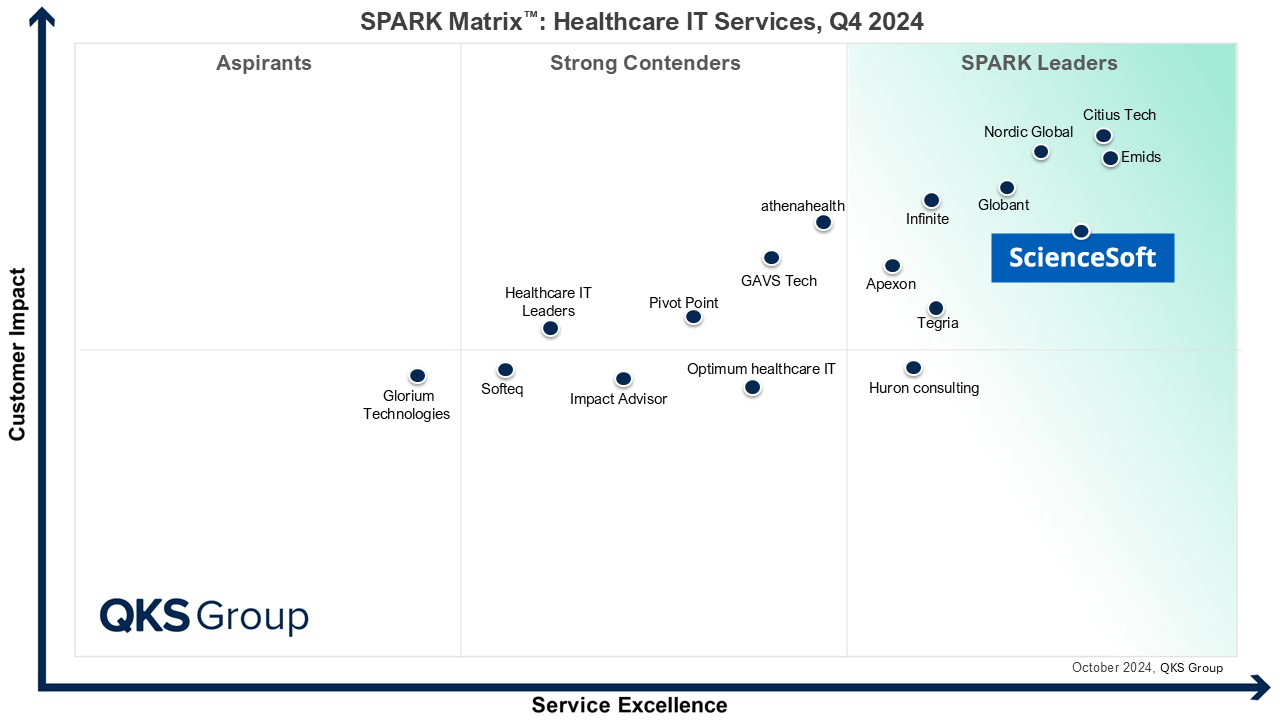
Featured among Healthcare IT Services Leaders in the 2022 and 2024 SPARK Matrix

Named among America’s Fastest-Growing Companies by Financial Times, 5 years in a row

Claude Certified Services Partner

Microsoft Solutions Partner for Data & AI

HTN Now Awards 2025/26 finalist in the Best AI Scribe Solution category

Recognized for Healthcare Technology Leadership by Frost & Sullivan in 2023 and 2025
HIMSS Gold member advancing digital healthcare

ISO 13485-certified quality management system
ISO 27001-certified security management system
Our Clients Say



Working with ScienceSoft was a pleasure from A to Z. Their deep knowledge of the healthcare industry specifics and DICOM standard helped us create the back end of the software for our ultrasound scanner. We are grateful for their can-do attitude, responsiveness, and straightforward communication.


I am particularly impressed by the cooperative nature of ScienceSoft's team. Our project required coordination with multiple companies and individuals. ScienceSoft worked well with everyone. They are reliable, thorough, smart, available, extremely good communicators and very friendly.


After we shared our interest from the medical perspective, ScienceSoft suggested we explore it through a Proof of Concept – and took full ownership of its development. They collaborated with our medical professionals with great professionalism and care, respecting the research environment and its unique challenges.