Healthcare
 Insurance
 Investment



News Trap Add-In for SharePoint and SharePoint Online
What Is News Trap?
The News Trap add-in can become a valuable part of your SharePoint intranet, especially if your employees are active news followers. The add-in displays multiple RSS feeds and allows users to select and save the news that they want to view later. If a user tries to save news that has already been saved earlier, a special notification will appear. To view the selected news, users can click a link on the top of the add-in.
How to Get the Add-in?
You can download the News Trap add-in from the Office Store.
How to Configure the Add-in?
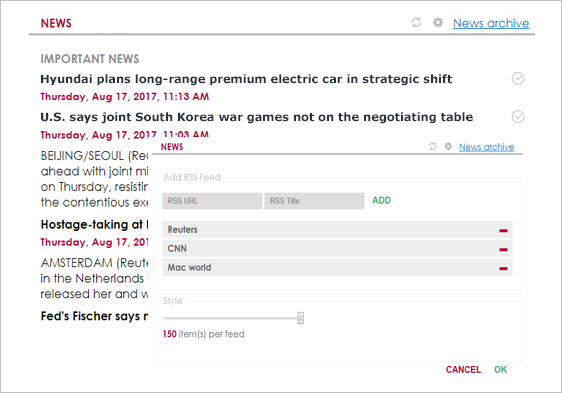
To configure the News Trap add-in, please click the gear icon on the title bar:
1
Enter a feed URL and a title and click the ADD button to add a new RSS feed.
2
To remove a feed, click the Minus Sign (-) button on the feed list.
3
Select the number of news to be displayed. The selected number will apply to all feeds.
4
Save the selected number of news by clicking the OK button.
5
To get the latest information click the Refresh icon on the top bar.
How to Add the App to a SharePoint Page?
To add the News Trap app to a SharePoint page, please follow the instructions.
Important note: The News Trap app uses Yahoo Query Language (YQL).
What Does It Look like?