ScienceSoft Global
 Healthcare
 Insurance
 Investment



Supply Chain Management Portals
Features, Integrations, and Costs
ScienceSoft applies 21 years of web portal development experience to build supply chain management portals that centralize order and shipment data, streamline supplier collaboration, and support multi-party workflows.

Supply Chain Management Portals: Essence
Supply chain management (SCM) portals give manufacturers, distributors, retailers, and their suppliers a shared online workspace to collaborate and monitor material flows across the supply chain. Portals can consolidate purchase orders, confirmations, shipments, inventory, and documents in one place and connect to ERP, WMS, TMS, and other enterprise systems for live operational data. Some organizations enhance their SCM portals with assistive AI features focused on summarizing updates across partners, accelerating document reviews, and helping users navigate multi-step workflows.
A custom SCM portal is built around your partner roles, exception workflows, and ERP/WMS/TMS data model, so collaboration matches how you operate instead of forcing a generic template.
Supply chain management portals typically cost $100,000–$300,000+, with higher budgets driven by the need for software integrations, complex multi-party workflows, and AI modules. Try our free online calculator to learn what a tailored solution might cost in your case.
Core Features of a Supply Chain Management Portal
This is a curated set of capabilities based on ScienceSoft’s most frequent client requests. SCM portals typically start by centralizing supplier and carrier collaboration around orders, inbound shipments, and exceptions. They can later be extended with sourcing, forecast or capacity collaboration, and returns workflows. Advanced tendering features are usually delivered via a vendor portal or supplier relationship management solution, but can be embedded when required.
For suppliers

Partner onboarding
External partners move through a guided onboarding flow where they submit company data, certificates, banking details, and product information. Internal teams review submissions in an approval panel that shows pending items and reviewer notes. Partners see a progress tracker with completed steps, remaining tasks, and documents requiring updates.

Purchase order collaboration
Suppliers work in a purchase order inbox that lists all new and updated POs with item details, quantities, dates, and comments. They open each PO in a review screen to confirm quantities, propose date changes, and add clarifications. The PO’s conversation history panel captures confirmations, comments, and revisions for both sides.

Pre-shipment planning
Suppliers create advance shipping notices (ASNs) in an ASN creation wizard that guides them through packing details, pallet counts, carrier selection, planned pickup times, and more. Each ASN automatically appears in the buyers’ and warehouses’ inbound schedules, giving the teams early visibility into what is coming and when.
For buyers and procurement teams

PO management
Procurement teams work in a purchase order workspace that lists all open POs with supplier, site, date, and status filters. They can adjust quantities or dates directly in the PO edit panel and send updated orders to suppliers. A PO timeline automatically records every change, acknowledgment, and comment for full transparency.

Contract, pricing, and performance visibility
Procurement can open a supplier profile page with contract documents, pricing lists, SLAs, and certificates. A status indicator highlights items nearing expiration or awaiting supplier updates. A performance panel shows current lead-time reliability, fill rates, and on-time delivery, so buyers see recent performance trends before placing orders.

Issue, claim, and quality resolution
Buyers create discrepancy records from the related PO or ASN using a form that includes fields for received quantities, photos, damage notes, and responsibility assignment. Suppliers respond in the same record. When issues require returns or rework, the same record links to return shipments, replacement orders, or credit notes, helping procurement, quality, and logistics teams stay aligned.
For logistics teams, carriers, and 3PLs

Shipment creation and assignment
Logistics teams can view shipments that are ready for carrier or 3PL assignment in a shipment list with origin, destination, date, and load details. From this list, they can select a carrier, add handling instructions, and send a portal notification. Carriers can acknowledge loads, propose pickup times, and upload transport documents, with all actions recorded in the shipment’s event log.

In-transit tracking and event updates
Carriers post transport milestones, like pickup, hub arrival, border crossing, delay notices, and proof of delivery, through a transport event panel. Logistics teams follow progress on a real-time timeline that highlights late or missing events. Users can open event details to see the reporter, timestamp, and related comments.

Customs and compliance tracking
Cross-border shipments include a documentation checklist on the shipment detail page. Carriers and internal teams upload commercial invoices, packing lists, certificates of origin, permits, and other required documents. Each document shows a status, and customs notes are added directly in the shipment’s documentation tab.
For warehouse and operations teams

Delivery check-in
Warehouse teams work from an upcoming deliveries list featuring all ASNs with expected quantities and arrival times. During receiving, they open an ASN’s receiving panel to record actual quantities and attach photos of damages or shortages. Any discrepancies appear in the buyers’ review queue, where procurement and quality teams can evaluate and respond.

Inventory visibility and replenishment
Operations teams access an inventory dashboard showing on-hand, in-transit, and incoming quantities across locations. They can drill down to item views to see expected receipts and related ASNs. Suppliers with permissions can see a restricted visibility panel that shows how their materials are projected to move through the inbound flow.
For finance and administration

Invoice matching and financial alignment
Finance teams work in an invoice workspace where each invoice links to its related POs, ASNs, and receipts. The workspace shows match status, quantity differences, comments, and open discussions. Suppliers see invoice progress in a financial status dashboard.

Document management and audit readiness
All PO, shipment, invoice, and quality documents live in a structured document library. Each entry includes version history, associated records, and reviewer notes. Finance, compliance, and audit teams can quickly retrieve required files through filters and connections to the underlying transactions.
For executives and planners

Operational dashboards
Executives can view a cross-partner dashboard that brings together supplier performance, carrier punctuality, discrepancy trends, and throughput indicators. Planners use a cycle-time dashboard with views of PO confirmation times, shipment reliability, and recurring bottlenecks.

Forecast and capacity collaboration
Planners can share demand forecasts, inventory targets, and rough-cut capacity plans in the portal so key suppliers can review them, submit commits, and highlight capacity or material constraints. The portal tracks commit-versus-forecast, visualizes projected supply gaps by SKU and site, and lets buyers and planners negotiate updated plans in one place.
Shared governance and controls

Secure, role-based access and multi-partner views
Role- and company-based access controls ensure each supplier, carrier, 3PL, contract manufacturer, tier-2 supplier, and internal team sees only relevant orders, shipments, and documents. Single sign-on and audit trails protect sensitive data and support compliance with corporate and industry policies.

Role-specific alerts and work queues
A central alerts engine monitors orders, shipments, invoices, certificates, and tasks from ERP, WMS, and TMS. Each role gets a tailored alerts panel and work queue, with every alert linking directly to the related PO, ASN, shipment, or invoice.
AI Capabilities for Supply Chain Management Portals

Natural-language support and navigation
A built-in LLM (large language model) portal assistant can allow users to ask questions in plain language (“show POs at risk this week,” “why is this shipment delayed?”) and receive context-aware answers from portal data. Full-fledged AI agents can also independently trigger standard portal actions, such as sending reminders, creating discrepancies, or preparing onboarding tasks.

Smart document capture and classification
AI models can process invoices, ASNs, customs documents, certificates, and claim photos uploaded to the portal. A combination of image recognition and NLP engines can extract key fields, suggest tags, and pre-fill discrepancy or onboarding forms for review. This reduces manual data entry for partners and internal teams and speeds up matching, approvals, and audits.

AI-assisted exception triage and next-best actions
The portal can aggregate open discrepancies, delays, shortages, and invoice mismatches and use AI to group them by impact and recurring patterns. Users see which issues are likely to hurt service levels or critical orders first, along with suggested next steps and draft messages. Final decisions stay with planners and buyers, but routine triage becomes much faster.

AI support for supplier selection and bidding scenarios
In portals that include sourcing or light tendering features, artificial intelligence is often used to surface preferred suppliers based on past performance, pricing patterns, and risk indicators, and to analyze bidding activity during e-auctions. These models help buyers compare responses more consistently and identify anomalies or outliers without replacing the underlying sourcing workflow.
Supply Chain Management Portal: Integration Map
Most supply chain management portals start with these core integrations, but the final integration map will depend on your existing IT ecosystem.
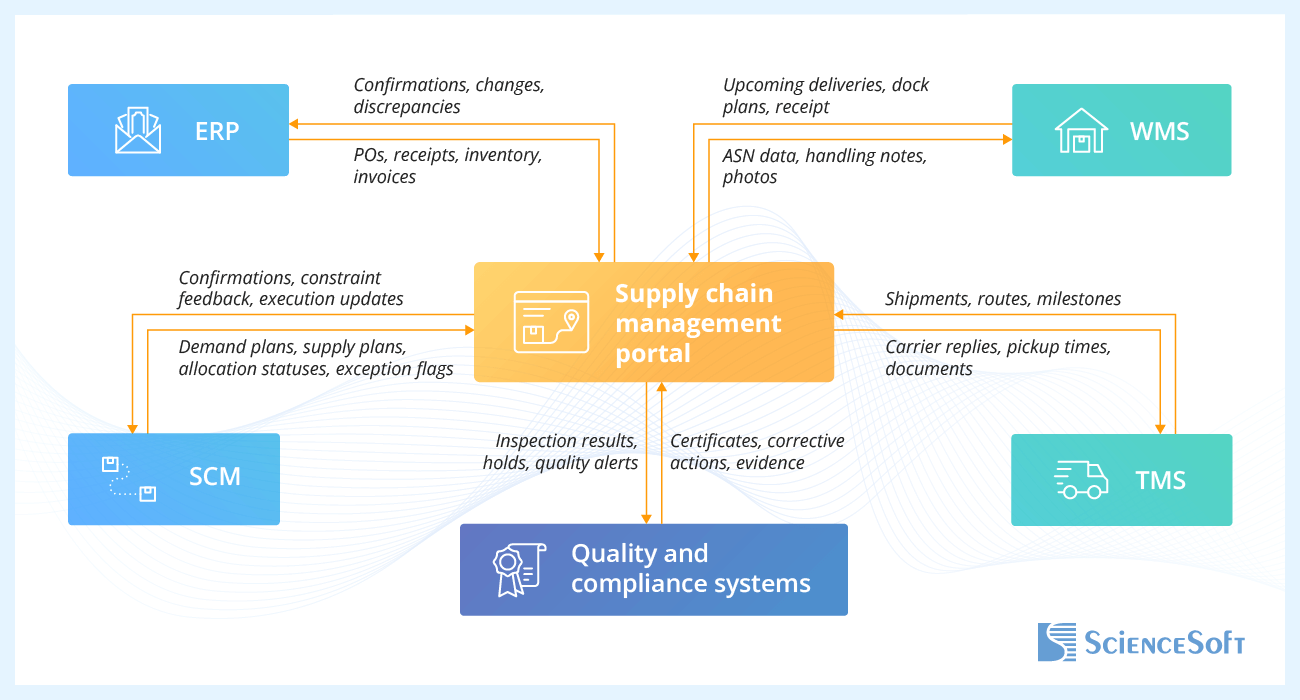
- Enterprise resource planning (ERP) keeps orders, receipts, stock balances, and financial statuses aligned with what users see in the portal.
- Supply chain management system (SCM) provides planning outputs and execution signals that give context to portal collaboration.
- Warehouse management system (WMS) remains the source of truth for on-site operations, while the portal gives upstream users and partners a clear picture of incoming and received materials.
- Transportation management system (TMS) and carrier systems handle load planning and execution; the portal focuses on shared shipment visibility and carrier collaboration.
- Quality and compliance systems manage inspections and nonconformances; the portal exposes the elements needed for suppliers and buyers to resolve issues together.
Development Tips for Supply Chain Management Portals
Based on ScienceSoft’s experience with supply chain and partner-facing software, our consultants and project managers share key considerations for developing SCM portals.

Portal as a collaboration layer
In mature implementations, ERP, APS, warehouse, logistics, and quality software stay the systems of record for planning and execution. The portal serves as a role-based collaboration layer for viewing shared data, confirming changes, exchanging documents, and coordinating with partners. In simple terms, the portal may collect multi-party documents or display historical records, but doesn’t have its own separate supply chain record. This prevents data duplication and silos, which are common pain points in supply chain operations.
Design focus: exception and issue workflows
In practice, SCM portals are used most heavily to handle delays, shortages, damaged goods, and certificate gaps. Best practice would be to focus on designing these flows around a single shared issue record, a limited and consistent set of statuses, and explicit ownership at each step. This approach reflects a common trade-off: capturing enough context for resolution and auditability while keeping exception handling fast enough that users rely on the portal instead of reverting to email.
Platform-based and custom elements combined
Many SCM portal projects use an established platform for core capabilities such as identity management, role-based access, dashboards, and standard UI components. This speeds up delivery and reduces risk for common portal functions. Custom development is then applied to areas that reflect specific supply chain workflows, such as multi-party exception handling or role-sensitive views, keeping the portal flexible without rebuilding everything from scratch.
Low-code tools for iterative UX and workflow update
In SCM portal projects, low-code tools are often paired with custom development for areas that change frequently after launch, such as forms, approval steps, notifications, and dashboards. These tools let business and operations teams adjust workflows without developer involvement, while partner-facing views, complex permissions, and performance-critical interfaces remain implemented with custom code. This balance supports faster iteration without compromising portal stability or scalability.
Supply Chain Management Portal: Cost Estimation
In ScienceSoft’s experience, developing a supply chain management portal would typically require an investment of $100,000–$300,000+. Below are approximate tiers of portal functionality that you can expect within this range.

$100,000–$200,000
A portal with core functions: supplier onboarding, confirmation views, ASN creation, and an upcoming-deliveries list for warehouse teams. Best fit for companies digitizing essential supplier collaboration and replacing email- and spreadsheet-based workflows.

$200,000–$300,000
Adds carrier-facing shipment pages, transport milestone updates, certificate tracking, and configurable dashboards for procurement, logistics, and operations. Suits organizations with multiple external partners and higher inbound volumes, where shared visibility and clear responsibilities across roles are critical.

$300,000+
Adds tailored UI, complex approval and exception workflows, and performance dashboards for suppliers and carriers. May feature assistive AI tools. Typically chosen by enterprises aiming for supply chain coordination across many sites, partners, and product lines.
Want a more precise figure?
ScienceSoft's team is ready to provide a quote for your specific case.
Our Clients Say


Metrics Holdings collaborated with ScienceSoft on four projects. <…> What stood out the most was ScienceSoft’s holistic approach throughout the projects. They consistently focused on the bigger picture, offering centralized solutions rather than just resolving isolated issues with our existing tools.



As we continue to develop our SharePoint and extend its use across our company group, we are confident in ScienceSoft's ability to guide and support us. We wholeheartedly recommend ScienceSoft to any business looking to optimize their digital infrastructure.


The B2B customer portal meets our business needs of enhanced pricing invoicing and contracting and overall client communication. We are fully satisfied with the solution and the assistance of ScienceSoft’s team.


We engaged ScienceSoft to develop an end-to-end blockchain platform for wine supply chain traceability, and they took the project to unprecedented heights. They treated our product as their own and made sure it was commercially and technically viable from the onset.


What sets ScienceSoft apart is their ownership mindset, reliable processes, and ability to take initiative.
Why Build Your Supply Chain Management Portal With ScienceSoft
- Since 2005 in web portal development for 30+ industries, including healthcare, insurance, investment, manufacturing, retail and wholesale, logistics, construction, hospitality, and more.
- Since 2012 in supply chain software development.
- In-house cybersecurity engineers and compliance consultants to design for data security and region-specific privacy regulations from day one.
- An in-house Project Management Office with 45+ project managers applying shared standards to ensure predictability, cost control, and adaptability across projects.
- Strong architecture practice with 30+ solution architects, including 10 principal architects, supporting complex, multi-module portal initiatives.