ScienceSoft Global
 Healthcare
 Insurance
 Investment



Client Portals for Construction Companies
Features, Integrations, AI Tools, and Costs
With 21 years in web portal development, ScienceSoft engineers client portals for construction that make RFIs, submittals, and project views simple to track and approve.
Construction Client Portals in Brief
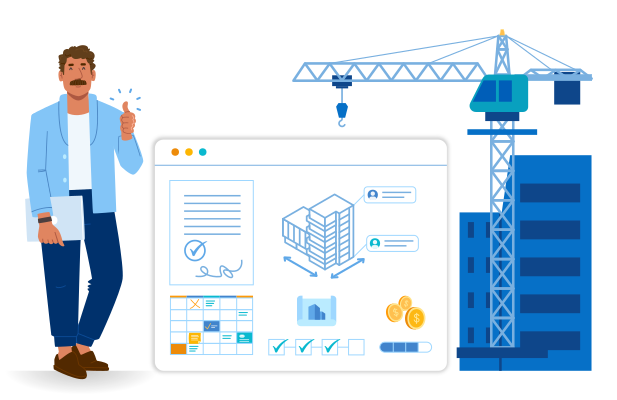
Construction client portals are secure, contractor-run workspaces that allow clients to track all project progress in one place, with live updates on budget, schedule, and risks. Such portals centralize all client-facing workflows, from RFIs and submittals to change orders, keeping approvals time-bound and fully auditable. The result is clearer communication, faster decisions, and a single source of truth for client interactions and project records.
For midsize construction firms, the development cost of a platform-based client portal typically starts at around $40,000, with more advanced configurations (complex workflows, AI, multiple integrations with other software) often requiring $150,000 or more. Use our free online calculator to get a cost estimate for your case.
Construction Client Portals: Features
The capabilities below reflect portal setups often requested by ScienceSoft’s clients in the construction industry. Each portal is configured around the individual company’s workflows, systems, and business priorities, so your feature set may differ.
Project visibility and collaboration

Project tracking
Clients can see totals, due dates, and project status on a configurable live dashboard. Daily progress logs capture crew activities, deliveries, and any weather-related delays. Photo timelines organize images into date-stamped sequences for each location.

To-Do dashboard
Each client workspace includes a To-Do view that lists every item awaiting client action (e.g., approvals, document reviews, or clarification requests). The dashboard highlights due dates and responsible roles, sends reminders as deadlines approach, and links each task to its related document or record.

Budget and expenses view
Clients have access to a financial dashboard showing planned versus spent amounts, pending payments, and approved changes. Each item is linked to the related invoices, change orders, and approval records.

Project portfolio view
Executives can view multiple projects in a single big-picture dashboard. They can monitor budget burn and schedule variance, open RFIs or submittals by project, and filter by program, region, or phase.

Requests and orders
The portal centralizes RFIs, submittals, and change orders in a single, trackable flow. Both sides can initiate a request, attach drawings and supporting documents, and describe the issue or proposed change. Each item records the initiator, current owner, due dates, impact notes, and e-signature history.

Punch list and inspections
Field teams can capture issues with photos, locations, and categories, upload them to the portal, and assign them to trades with due dates and priority. Clients can see real-time inspection status, add comments, and sign off on fixes.

Communication tools
Clients can message the contractor team directly in the portal or @mention them on RFIs and other project items. They can also book online or in-person meetings from available time slots. Where needed, simple support ticket forms (for issues like portal access or billing) capture key details and show the assigned owner and current status.

Digests and notifications
The portal auto-generates daily and weekly summaries for clients to receive in their portal inbox or via email, text, and other preferred channels. When an approval is required, the next assigned approver on the client or contractor side receives a notification.

Billing and payments
Contractors can send invoices to clients through the portal by uploading ready documents or syncing them from billing or ERP systems. Clients can review billed work and associated charges, submit payments in the portal or via their AP system, and track receipts and payment history.
Documents and models

Documents and drawings
Clients can access the latest drawings and documents for their projects via the portal and download them if necessary. In the portal view, they can zoom and highlight sections and add comments for the project team. Where required, clients can also review and e-sign document packages in the portal, with signed versions automatically linked to the relevant project records.

Model viewing
Clients can open IFC/Revit 3D models and 2D sheets directly in the portal. The embedded viewer allows them to rotate the model, zoom in, and pin comments to specific areas. Access rules apply across all project content: each client only sees documents, drawings, and models linked to their own projects and flagged as client-safe, while internal contractor notes and working files remain hidden from client views.

Document vault
The portal includes a secure, central storage area where all project files are tagged for quick search with ISO 19650-aligned metadata. Retention policies and legal holds protect records for the required period, and immutable logs capture uploads, edits, downloads, shares, and e-sign events. Official transmittals record recipients and delivery times, while versioning keeps the latest approved files on top.

Digital handover package
Upon completion, the portal compiles as-builts, test reports, warranties, and manuals into a single handover package for operations and maintenance. Files are tagged by system, asset, and location, remain searchable throughout the asset’s lifecycle, and can be safely shared with facilities, HSE, and maintenance teams under role-based access.
Access and governance

User provisioning and offboarding
The contractor’s admins can create and manage isolated workspaces per client or project, grant or revoke user access, and process client requests for profile changes. Access rights are automatically removed at project close or after a set time period.

Role-based access and SSO
The contractor defines user roles and access permissions, and enables single sign-on as needed, so that enterprise clients can log in with corporate credentials and view only permitted information.
AI in Construction Client Portals
Assistive GenAI tools can make a construction client portal more responsive, accurate, and transparent for both contractors and clients. The most relevant use cases focus on improving everyday collaboration, data handling, and decision-making across shared workflows.

Conversational assistant and smart search
Clients and project managers can ask natural-language questions (e.g., “What was done in September?” or “Which RFIs are still open?”) and receive cited answers drawn only from approved project documents. The AI assistant can use retrieval-augmented generation (RAG) to search relevant files based on the user’s access level and present a concise reply with references.

Dashboard briefs
Each client dashboard shows a one-paragraph AI summary of current progress, schedule variance, and cost trends. The LLM analyzes project data and produces short explanations, such as “Two new change orders delayed the projected completion by three days.” This helps clients interpret reports without needing a project manager’s walkthrough.

AI-drafted client updates from daily logs and photos
Contractors can select a date range for a single project or a portfolio, and the AI agent will use a preconfigured template to draft a polished client update with linked evidence (photos, notes). The responsible PM reviews the client update and posts it directly to the client’s progress dashboard on the portal, reducing the need for extra calls, emails, and slide decks.

Model explanations
In the 3D/2D model view, a client or contractor PM clicks on a room or element; the AI assistant pulls only linked, approved records for that location (e.g., drawings, specs, requests for information, and change notes) and shows a short explanation in a side panel with one-click sources. This cuts “What is this?” emails and speeds approvals by consolidating explanations, evidence, and next steps into one place.

How to minimize contractual risks from AI-generated explanations
You can use RAG to make any commercial LLM base its answers on your approved project documents and policies. To avoid hallucinations, set a confidence floor on retrieved sources (e.g., cosine ≥ 0.8). If below the floor, the agent doesn’t guess — it shows “No approved record found”, plus buttons for “Submit an RFI” or “Search documents”. If confidence is above the floor, the agent answers with source links to the exact files it drew information from. This matters because raw LLM “best guesses” would create contractual risk and likely increase support requests over time. Plus, with this setup, your in-house IT admins will be able to control the model’s accuracy even without specialized AI skills. Adjusting confidence thresholds tunes how strict the agent is (higher = safer, fewer answers); adjusting the model’s answer templates controls the wording and rules for showing metadata and next steps.
Integration Map for Construction Client Portals
These are the core integrations most construction portals start with, although your final integration map will be shaped around the PM tools, design software, field apps, and financial systems already in use on your projects.
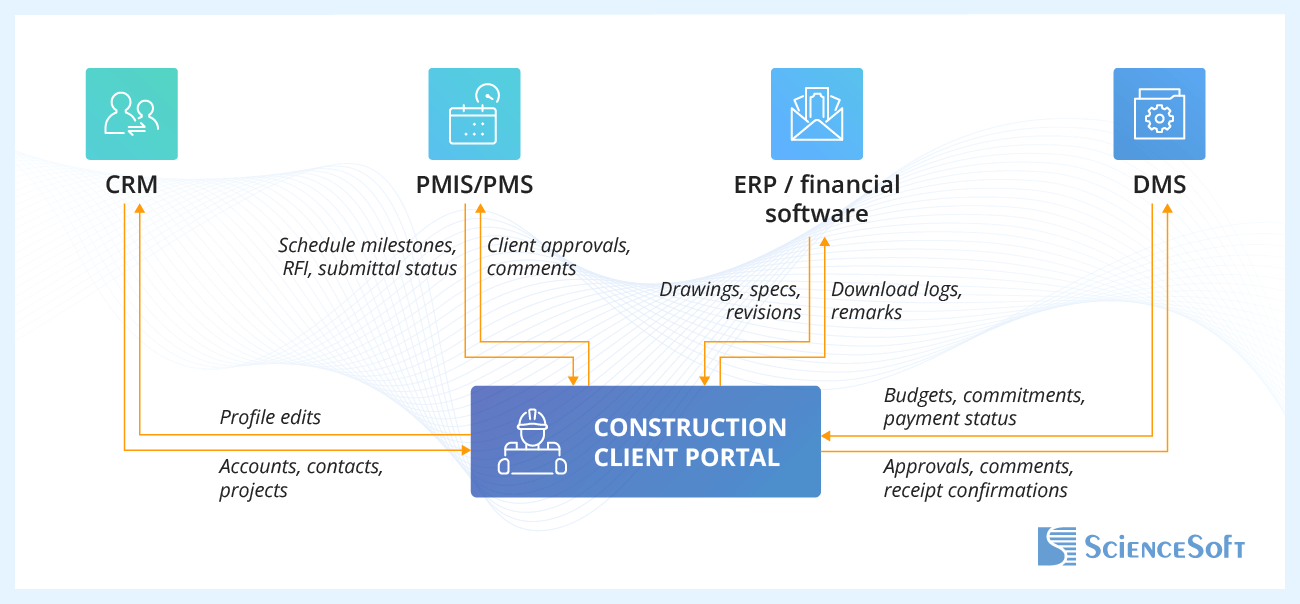
- Customer relationship management (CRM) aligns account data, contacts, and project rollouts with customer profiles in the portal.
- Project management system (PMIS/PMS) stays the system of record for schedules, RFIs, submittals, and change orders, while the portal exposes a client-safe view and collects their responses.
- ERP or financial software keeps project financials aligned between the back office and the portal, so clients see up-to-date budgets and payment status while their approvals and confirmations feed back into the finance system.
- Document management system keeps master files and drafts internal; clients see only approved, share-ready versions.
Construction Client Portals: Development Tips
Drawing on ScienceSoft’s experience with client collaboration software, our project managers and consultants share field-tested practices that reduce project friction, accelerate portal adoption, and improve visibility to support better decisions.

Build on proven platforms, add custom components where they matter
For most construction firms, it makes most sense to build a portal on an enterprise platform that supports external users and governance (e.g., SharePoint, Microsoft Power Pages) and lean on platform services (sign-in, storage, search, events, document recognition) to ship fast and keep upkeep low. The platforms’ default functionality will be enough to enable dashboards, document sharing, and request forms. Custom components, such as drawing comparisons, 3D model viewing, and branded UI, can be added when the platform reaches its limits.

Low-code for back office, not client UX
Low-code tools (e.g., Microsoft Power Apps) can help you reduce the share of costly custom code by adding automation logic via visual drag-and-drop builders. They are ideal for setting up internal processes behind the portal, such as request intake, simple approvals, and contact management. Low-code is less suitable for client-facing experiences that demand high performance and polish (e.g., large drawing and model viewers, richly branded workspaces); these can be added via a custom front end connected via APIs.

Document workflow as a core feature
For construction portals, ScienceSoft recommends providing full, auditable document workflows that maintain a clear revision history and enable side-by-side comparison and in-browser redlining.
As official document packages are exchanged, the portal should record recipients and delivery timestamps, support electronic signatures and attach approval metadata, so that every file has a complete history.

MVP released quickly
To roll out the portal faster, scope the minimum viable product (MVP) tightly. For most firms, core features will boil down to a milestone dashboard with daily progress logs, a single workflow for requests, reviews, and approvals, and documents with in-browser markup. These should be built first, so clients get immediate value and the majority of RFI workflows transition away from manual email. In ScienceSoft’s experience, you can expect 3–5 months to production in this scenario: 2–4 weeks for discovery and design, 8–12 weeks to build and integrate, then 2–4 weeks for the pilot to be validated and tuned.
The Cost of Building a Construction Client Portal
Based on ScienceSoft’s past projects, the cost of implementing a collaborative client portal usually falls between $40,000 and $150,000.

~$40,000–$70,000
A platform-based build with custom logic added via low-code builders. Includes key MVP modules: project visibility (milestone dashboard + daily logs), document viewing, and basic approvals and comments.

~$70,000–$100,000
A platform-based portal that adds customized UI elements, a unified sign-off workflow with due dates and e-signatures, document version history, in-browser document markup, and communication tools.

$150,000+
A highly customized portal featuring tailored branded interfaces, 3D model viewing with pinned comments, assistive AI agents, and integrations with internal systems.
Our Clients Say
Juan Carlos Santisteban
Systems Administrator

I highly recommend ScienceSoft for your IT needs, so much so that I’m keeping them on as advisors for any future work that might come up.


Harding and Carbone has been very pleased with selecting ScienceSoft as a web app development company for developing a web portal for our customers. Their professionalism, expertise, guidance, organization, and timing has been wonderful. They were also very patient with explaining their process and the next steps if we ran into any issues that we did not understand.


The initial agreement stage was easy and understandable, and we were able to start working on our requirements as fast as possible <…>. What especially positively resonates with us is that, if there were any cooperation issues, we were able to be fully open from both sides and solve them effectively.


We teamed up with ScienceSoft trusting a solid experience that the company had in the domain of web portal development, and never regretted the decision. ScienceSoft’s team proved to be knowledgeable, thoughtful, and highly motivated.



Why Build Your Construction Portal With ScienceSoft
- 21 years of experience in end-to-end web portal delivery.
- 1,900+ successful web development projects.
- Hands-on experience in assistive AI enablement.
- Long-standing Microsoft Solutions Partner for SharePoint and Microsoft 365 and a registered ServiceNow partner.
- 750+ IT professionals, including project managers, architects, consultants, software and DevOps engineers, QA specialists, cybersecurity experts, and data scientists.
- In-house Project Management Office (PMO) and 45+ project managers with PMP, CSM, PSM, PSPO certifications to ensure predictable delivery of web portal projects.