ScienceSoft Global
 Healthcare
 Insurance
 Investment



Project Management Client Portals
Features, Integrations, and Costs
ScienceSoft draws on 21 years of experience in web portal development to engineer project management and client portal solutions that boost multi-party collaboration and optimize resource planning.
Project Management Client Portals: The Essence
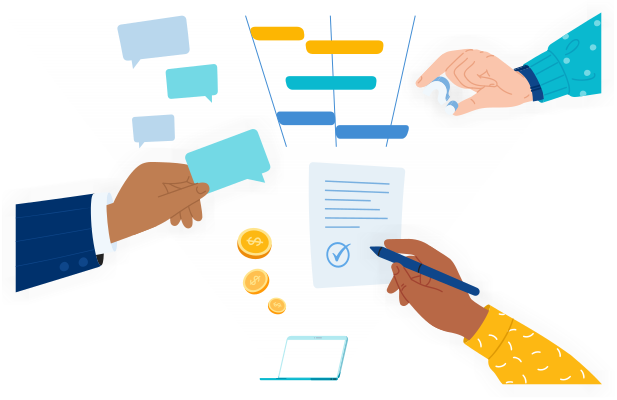
Project management client portals are collaborative platforms that offer clients and project teams a single workspace to track project progress, deliverables, issues, and key decisions without spreading these activities across email conversations and other tools.
These portals can integrate with internal project management and scheduling software, document management systems, and work tracking tools to synchronize timelines, workloads, and status views for clients. By bringing this information together, portals help PMs govern client communication across all their projects, improve project team productivity, and optimize how project resources are planned and used.
The cost of implementing a platform-based project management client portal typically ranges from $70,000 to $150,000+. Try our free online calculator to learn what a tailored solution might cost in your case.
Core Features of a Project Management Portal
This is a curated selection of client portal project management capabilities based on what is most requested by ScienceSoft’s clients. Each portal implementation is tailored to the unique workflows and business needs of a particular company, so your scope may differ.
Collaborative workspace

Request intake
Clients and internal teams submit new requests through customizable forms on the portal. Project managers move each request through clearly defined stages with assigned approvers and exit criteria. A request widget shows status and a dated activity log, and the portal sends updates to involved users at key progress points.

Approvals and sign-offs
The approvals area gathers all documents that require review and signature, along with their version history and assigned approvers. Clients can preview, comment, and e-sign directly in the portal, which stores a timestamped record. Each approval links back to the related project item, so anyone can quickly see what was agreed to and when.

Tasks and activity feed
Clients track deliverables on a shared task board showing owners, dates, and comments. Internal teams use detailed boards with subtasks, dependencies, and private comment threads. A recent activity feed highlights updates, decisions, and mentions since the user’s last visit.

Executive overview and scheduled summaries
Clients can access a project dashboard showing overall health, upcoming milestones, spending, and items needing attention. From there, they can open risks, changes, or financial details with one click. They can also subscribe to a weekly digest that highlights key updates and links back to the portal.

Files and feedback
Through an integration with DMS, which serves as the system of record, files are attached to the in-portal tasks they support. Stakeholders can use in-portal previews to compare versions and pin comment threads to files. When a thread is resolved, the decision appears in the activity log. Final deliverables display who approved them and when.

Schedules and dependencies
A project timeline shows upcoming phases and milestones, along with any dependencies that could cause delays. Clients can filter timeline items and add milestones to their calendars. The portal flags any changes in timelines and notifies affected parties.
Resource management

Time management
Teams log hours in their usual systems, while the portal shows consolidated, client-ready totals tied to deliverables. Project managers can quickly open any entry that looks incorrect, leave comments, and notify the owner for fixes.

Financial resource management
A “financials” view displays baseline, actuals, and forecasts as simple charts supported by brief notes from the PM. Key figures, invoices, and payment status are imported automatically from the ERP or other financial systems. Core accounting processes stay in their own systems of record, while the portal provides a shared place for discussion.

Physical resource management
A read-only availability board shows shared equipment and assets with current reservations and any conflicts. Project teams book items through a calendar, and confirmed bookings update the board. When availability is tight, managers can resolve clashes or suggest alternatives through a short request flow on the portal.

Human resource management
Project managers assign team roles and schedules in a capacity view that highlights skills, availability, and location. They can track workload and progress on a utilization dashboard, while team members see their tasks and deadlines in a personal work view.

Risk management
Each project can include a risks and issues board that tracks risk probability, impact, ownership, and follow-ups. Internal users see the full risk list, while clients view only the items requiring their input. Updating a risk creates a dated note, triggers notifications to involved parties, and links decisions to related tasks or milestones.
Security

Role-based access and workspace controls
Admins assign roles that decide which projects, pages, and actions each person can use. Permissions apply across all linked workspaces and update as soon as roles change. Clients and internal teams work in the same portal but only see the areas their role allows, so boundaries stay clear.

Audit trail and compliance reporting
The portal logs every view, edit, approval, and status change with timestamps and user identity. Project managers and compliance teams can export these records for reviews or audits. The audit trail gives a clear history of how project data and decisions changed over time.

Programmatic access and exports (read-only)
Admins can issue scoped API tokens or provide export feeds so that clients’ BI teams can reuse portal data in their dashboards. The portal gives clients governed, read-only access to data, while detailed permissions and rate limits follow API policies.

Tenant isolation and data separation
Each client has its own workspace with separate data, file links, and permission model. Users cannot browse or search outside their own client area, and shared infrastructure never exposes cross-client details. This setup supports strict confidentiality while keeping administration centralized.
Portal experience

Branding and tailored start pages
A platform-based portal can be branded with the company logo, colors, and domain name to feel first-party. Portal admins can set default views by role for both clients and internal teams, so that each user sees only relevant dashboards and actions when logging in.

Knowledge base and onboarding kits
Project leads can publish guides, examples, and FAQs so clients quickly learn common workflows and portal conventions. The portal hosts readable knowledge articles and links, while authoring, versioning, and multilingual support can be managed by your main knowledge platform.
Value-Adding AI Capabilities for Project Management Portals

Self-service Q&A over project data
LLM assistants can also let clients ask free-form questions (e.g., “What changed in the SOW?” or “Who owns this workstream?”) and receive short, cited answers instantly. The assistant interprets intent, searches across statements of work, tickets, change logs, and knowledge articles, and returns a simple explanation with links to the source. This reduces repeated clarification requests and shortens decision cycles for both sides.

Client-ready digests and meeting briefs
LLM-based data summarization turns scattered project activity into clear updates without added effort from the project manager. The in-portal AI agent uses natural language processing (NLP) to read tickets, comments, documents, and speech-to-text meeting notes, then compiles short digests for clients and teams. This reduces manual communication efforts and keeps everyone aligned between touchpoints.
Integration Map for Project Management Client Portals
Below are the integrations ScienceSoft’s teams typically set up for project management client portals. Solution architects work with you to shape an integration map that fits your processes, existing tools, and tech stack.
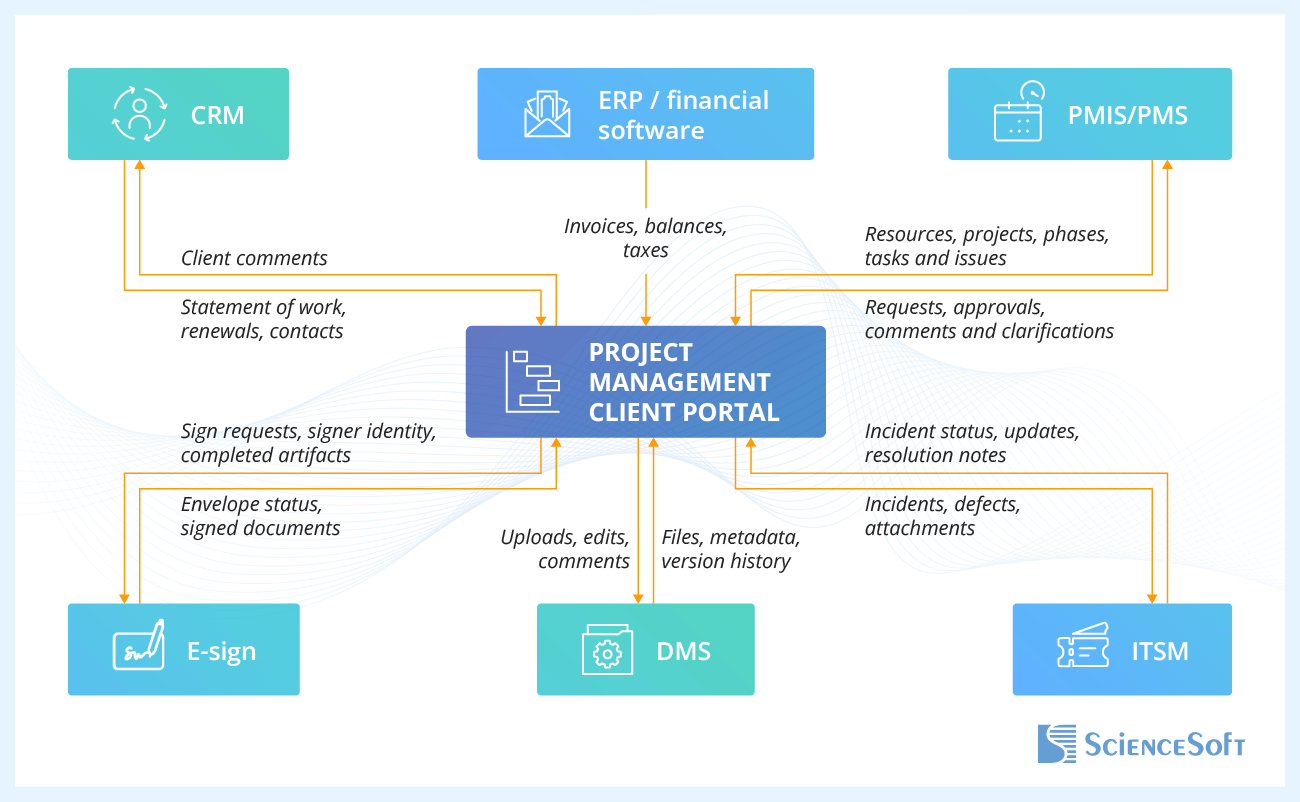
- Customer relationship management (CRM) syncs verified account structures, contacts, and SOWs so client workspaces display the correct stakeholders and entitlements.
- Enterprise resource planning (ERP) or financial software aligns orders, invoices, balances, and entitlements with what customers see in the portal, so finance and project teams work from the same numbers.
- Project management, scheduling, and work tracking tools integration keeps internal project plans, tasks, time entries, and budgets in the system of record, while the portal shows a client-friendly view of progress and performance.
- Ticketing and issue tracking (ITSM) connects the portal to your service desk so clients can log issues once and follow them through to resolution.
- Document management system (DMS) integration keeps master files in your document system while letting clients and project teams co-author, review, and share documents via the portal.
- E-signature software enables digital signing and retrieval of contracts, SOWs, change orders, and other approvals via the portal.

Use strict read/write boundaries to protect internal processes
Set clear rules: what the portal may show (milestones, deliverables, issues, documents), what it may collect (approvals, comments, clarification requests), and what it must never override (resource plans, budgets, internal tasks). These boundaries keep the portal safe for external use and prevent accidental exposure of internal planning details through integrations.
Development Tips for a Project Management Client Portal
Drawing on ScienceSoft’s experience with customer web portals and project solutions, our consultants share recommendations for planning and implementing project management client portals.

Use portal platforms for faster rollout and lower risk
For most organizations, using an existing enterprise platform as the foundation for a client portal is much more cost-efficient than building every layer from scratch. For example, Microsoft 365 (SharePoint, Teams, Power Platform) or Atlassian’s stack (Jira, Confluence) already provide identity management, basic workspaces, and security models that can be extended with custom components. Treating the portal as a tailored front layer on top of these platforms helps shorten delivery time, reuse familiar tools for internal teams, and simplify ongoing administration. However, ScienceSoft advises planning tenant architecture, client isolation, and integration boundaries carefully to avoid hard-to-change limitations later.
Combine low-code and custom development for a balanced build
Any platform-based portal will still require some customization to fit your internal workflows perfectly. Low-code platforms such as Microsoft Power Apps can replace costlier custom code for back-office portal logic that need frequent tweaks, such as configurable request forms or approval flows. However, low-code tools don’t perform as well in client-facing areas that require performance-intensive UI or complex permissions — those are best implemented with custom code. This hybrid approach keeps the client experience polished and scalable while allowing faster changes behind the scenes, and it reduces the risk of locking critical user journeys into a single low-code vendor.
Enable a smooth mobile experience without a dedicated app
ScienceSoft advises designing the portal so that the same web UI works well on phones and tablets, without a separate mobile app. Responsive layouts, touch-friendly controls, and task-focused mobile views make it easy for clients to check project status, review documents, comment on deliverables, and approve change requests on the go.
Project Management Client Portal Development: Cost Estimation
Building a project management client portal typically requires an investment of $70,000–$150,000+, with the upper range covering AI capabilities, bespoke interface, and complex project workflows.

$70,000
A project management client portal MVP with core features: clients can view project data and documents, track progress, and submit simple forms. Custom logic is mostly implemented via low-code tools, with a standard UI based on the chosen platform.

$70,000–$150,000
A moderately customized portal that adds client-specific workflows or UI components. Clients get more interactive features, such as co-editing shared documents. The build may include 1–2 integrations with internal systems on the same enterprise platform.

$150,000+
A highly customized portal with a tailored UI, complex workflows, and multiple integrations with other enterprise software and third-party platforms (e.g., for e-signing). May include AI capabilities, such as intelligent Q&A and AI-generated status summaries.
Our Clients Say



ScienceSoft’s .NET and DevOps engineers have been our go-to partners for enhancing and supporting Projecis, our project management software product. Working with them has been a genuinely positive experience. What I appreciate the most is that they offer well-considered solutions that meet our timeline, quality, and cost-efficiency goals.



The B2B customer portal meets our business needs of enhanced pricing invoicing and contracting and overall client communication. We are fully satisfied with the solution and the assistance of ScienceSoft’s team.

Our collaboration was a true partnership. The team was open, attentive to our requirements and accurate in addressing them. We like the portal’s look and feel and functionality.



Why Build Your Project Management Client Portal With ScienceSoft
- Since 2005, ScienceSoft has been building self-service web portals for customers across healthcare, insurance, and investment.
- 1900+ successful web projects.
- In-house PMO to drive projects to success despite limitations.
- 750+ IT professionals to cover every project step: discovery, UX/UI design, architecture, coding, integrations, testing, deployment, and post-launch support.
- In-house cybersecurity engineers and compliance consultants to design for security and region-specific privacy regulations from day one.
- Dedicated QA team to ensure zero critical defects in production and stable, predictable portal performance.