ScienceSoft Global
 Healthcare
 Insurance
 Investment



Client Portals for Marketing Agencies
Capabilities, Integrations, and Costs
With 21 years of experience in web portal development, ScienceSoft engineers client portals that connect CRMs, analytics, and campaign tools into a single workspace for smooth collaboration and data-driven decisions.
Client Portal for Marketing Agencies: Summary
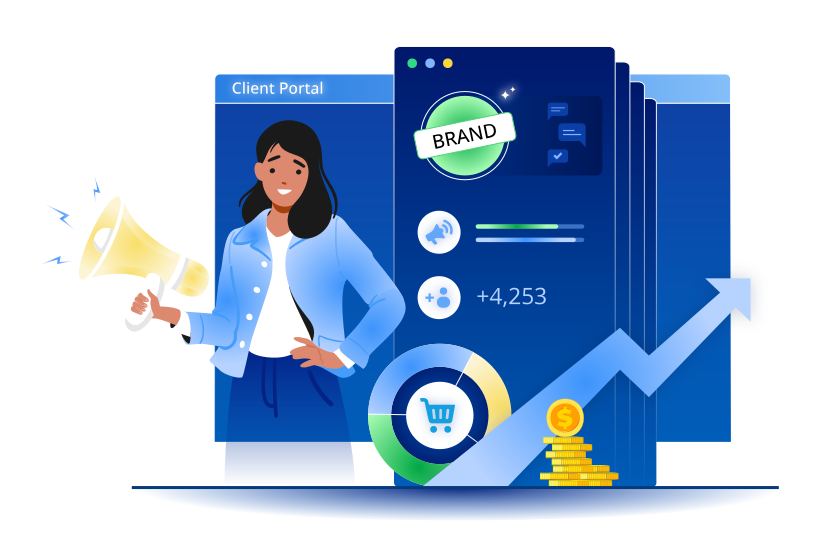
Client portal solutions allow marketing agencies to give clients a dedicated space to view project progress, share assets, and collaborate without redundant email chains or slide decks. Portals centralize client management and reduce confusion about marketing metrics and timeframes. With secure, role-based access and consent-aware reporting provided by customized portals, agencies reduce “your numbers vs. ours” disputes, speed up approvals, and cut manual work on reports, saving hours of work time per employee each week.
Depending on the number of integrations, compliance needs, and AI features, a client portal for a midsize marketing agency typically ranges from $40,000 to $300,000+. You are welcome to use our free online calculator to get a cost estimate for your case.
Client Portals for Marketing Agencies: Essential Features
The features below reflect the options most requested by ScienceSoft’s clients. Every client portal is tailored to the agency’s specific workflows, data sources, and business goals, so your final scope may differ.
Core portal workflows

Marketing performance dashboards
Up-to-date views of media and search visibility, website and content performance, leads, sales pipelines, and won revenue. Each dashboard shows its source of truth and last updated time, reducing the need for slide decks and “your numbers vs. ours” disputes.

Real-time campaign alerts
The portal monitors spend, conversions, CPL, and pacing across channels; it flags spikes or drops using configurable rules and comparisons (week‑over‑week, same weekday). Alerts appear in the portal, email, or Slack/Teams for selected recipients.

Conversion events and lead matching
A lead dashboard shows each on-site conversion (forms, chats, bookings, calls) with source, campaign, audience or keyword, and page. Events are linked to CRM records by clues (email, phone, click IDs, time windows) to display opportunity status and revenue; unmatched items are flagged.

Project status and activity log
A client-facing status page shows milestones, owners, due dates, and dependencies pulled from your PM tool (no internal notes are shown to clients). Each workspace keeps a chronological log of changes (who/when/what) with links; clients can subscribe to or export the log.

Request intake
Clients can submit briefs (new campaigns, landing page updates, budget or creative changes), upload files, and complete onboarding and approval checklists via the portal using automatic workflows.

Work intake and routing
Approved briefs are routed to the right team (media, creative, web, analytics) by service type, brand, and region. A configurable rules engine automatically sets due dates, attaches media assets, and publishes client‑safe status views.

Commercials and e-signatures
Clients review SOWs or raise change orders and sign electronically from the same space where they track project progress. The portal keeps an audit trail of who signed and when for quick reconciliation.

Brand center
Each client workspace includes a brand hub with that client’s approved guidelines and assets. Users can find regional variants and approvals (logos, templates, images, sample copy), tagged by brand, market, and language; older files are archived to avoid stale use.

Proofing and collaboration
A proofing workspace keeps document versions, comments, and deadlines in one place. Stakeholders from the client and agency can be invited to review particular items, with reminders for pending tasks. The approval rationale and responsible persons are attached to the final asset in the brand center to prevent disputes.

Knowledge base and support
Clients can look up how-to articles from the knowledge base and open support requests in one workspace. Each submitted issue is stored in a trackable thread with priorities and SLAs to reduce email loops and promote transparency.

Industry benchmarking
Compares a client’s marketing and sales results to peer ranges (from third-party or internal datasets) on a benchmarking page, helping set realistic goals and track progress.
Convenient data exchange for clients

Exports and sharing
Clients can export their on-screen view as PDF, PPT, or CSV, or share a secure link to the same live view. Each exported report or API file automatically includes the same filters, time zone, currency, and “last updated” info from the portal view.

Programmatic access
Client-side developers can fetch the same numbers shown in the portal via convenient APIs or scheduled exports to join with the client’s internal systems with no manual downloads or scraping.

Self-service connection center
A self-service area can allow clients to securely connect their marketing tools (e.g., Google Ads, Facebook Ads, GA4, HubSpot, Shopify) by approving read-only access using OAuth or API keys. This way, the portal can automatically pull, refresh, and monitor data from the client-side sources, keeping every report up-to-date without manual imports.
Security and governance

Identity and access
Single sign-on, multi-factor authentication, session time-outs, and audit logs support user activity tracking and access management. For enterprise or high-security clients, optional per-client SSO integration can be enabled to align with their internal identity systems.

Security and compliance
Role-based access, backup and retention rules, and configurable data-residency options help the agency meet privacy and security obligations across regions. Settings can be tailored per project or client group, with hosting aligned to regional compliance requirements (e.g., CCPA, GDPR, PDPL).

Granular access controls
Portal admins configure who can see which brands, regions, products, or campaigns, enforced even inside the same chart via row-level security.

Tenant isolation options
Tenant isolation ensures each client’s data and permissions are completely separate within the shared portal, so agencies can host many clients securely on one system, which is more cost-efficient than adding a new portal deployment separately for each client.
AI Capabilities to Enhance Client Portals for Marketing Agencies

Executive briefs on dashboards (LLM)
On any report page, clients can see an auto-generated summary of the current view (key changes, trends, and comparisons) that was generated by an LLM pulling from the same data. For example, “Sessions increased by 12% compared to last week, driven by paid search traffic from the US.” This helps clients navigate data and reduces requests for explanations.
Ask‑the‑data assistant (LLM + RAG)
A chat assistant can use retrieval‑augmented generation (RAG) to answer client questions only from approved portal content: dashboards, definitions, and briefs. It cites the visual or document used and respects row-level security when processing user queries. Typical prompts: “show last week’s ROAS by channel” or “what changed after the tag fix?”
Request triage & routing (NLP + ReAct)
Incoming briefs and support requests are automatically categorized by service type, brand, region, and urgency using natural-language processing (NLP) and a ReAct-style reasoning workflow. The assistant applies routing rules based on past resolved cases and user feedback, sending unique or ambiguous items for human review to prevent misroutes and save handling time.
Call summaries for lead quality insights (Speech‑to‑text + LLM)
A short LLM summary of recorded prospect calls appears beside each campaign lead; sentiment, topics, interruptions, and action items are extracted automatically. This way, clients can quickly assess lead quality without opening full recordings, while agencies use this view to spot trends in intent and feedback. Before analysis, call transcripts are scrubbed of personal data like names, phone numbers, and emails.
How Client Portal Integrates Into Your Marketing Workflows
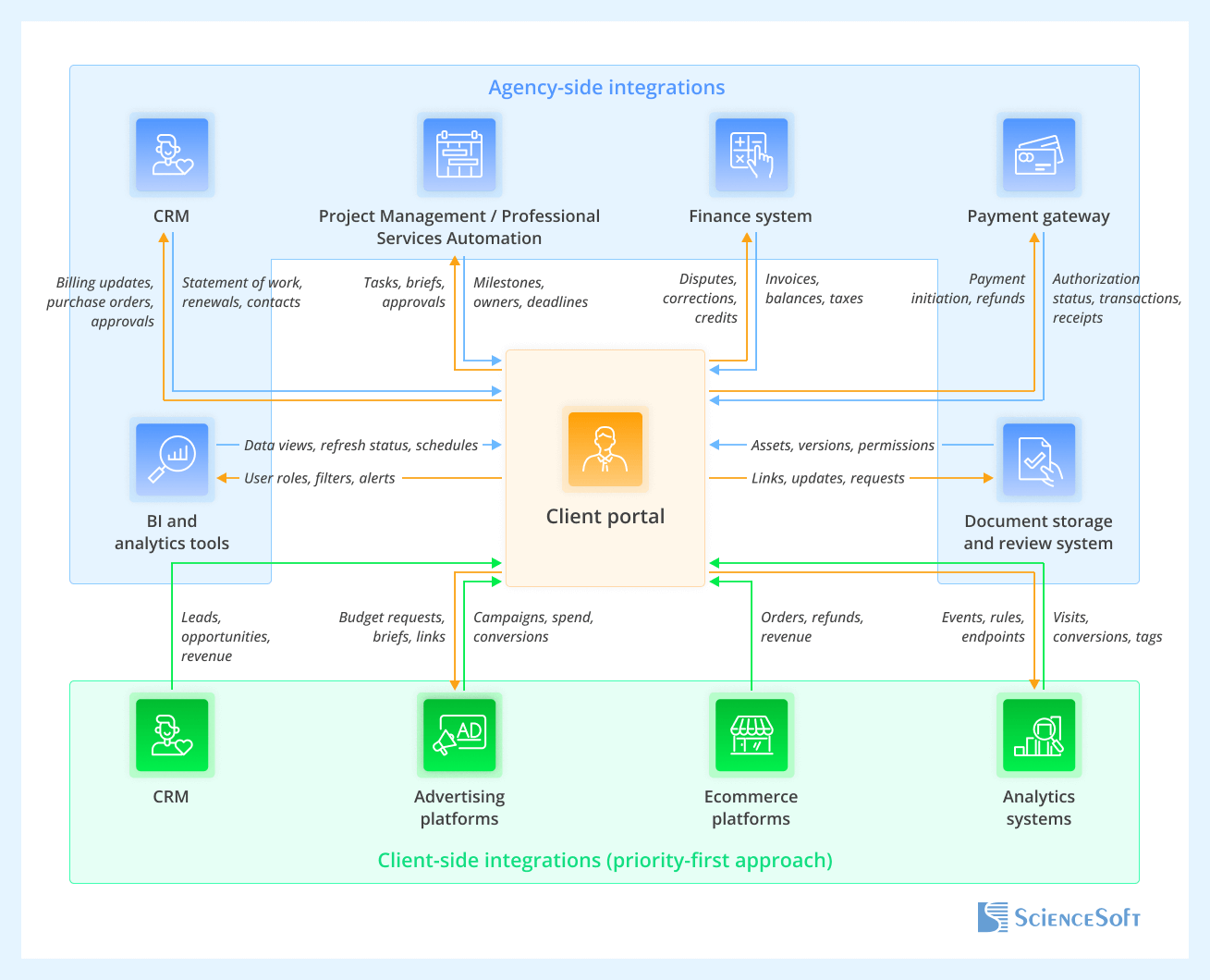
Agency-side integrations
- Customer Relationship Manager (CRM). Shows client-safe business context next to performance on the portal (contracts, renewals, key contacts, open requests).
- Project Management (PM) / Professional Services Automation (PSA). Shows a client-safe (no internal rates or comments) project status view on the portal and turns approved briefs from the portal into tasks in PM.
- Finance system (ERP or accounting). Integration with the agency’s finance system keeps billing and contract figures consistent with what clients see in the portal, reduces email back-and-forth, and supports audits.
- Payment gateway (e.g., Stripe, Apple Pay, PayPal). Enables secure online invoice payments inside the portal (cards, bank transfers, digital wallets) and records outcomes for reconciliation.
- BI and analytics tools. Enables reporting and shows interactive analytics dashboards directly in the portal.
- Search console (SEO visibility service). Brings organic query and page data into the portal to sit next to paid results.
- Document storage and review system (proofing or DMS). Stores and shares the official brand documents in the portal (guidelines, approved assets, and working files) with version tracking and granular access rights.
- Communications tool (e.g., email, Slack, Microsoft Teams). Delivers portal notifications into existing team channels for both agency and client recipients.
Client‑side integrations (priority-first approach)
Instead of trying to integrate with every external CRM, ad platform, or ecommerce tool on the market, ScienceSoft’s consultants recommend supporting the most widely used ones first. Applying the 80/20 rule, we can enable a small number of integrations that cover the majority of client use cases. Additional custom integrations can be added later for enterprise and high-value clients only. This model keeps rollouts fast and auditable while letting enterprise clients add deeper connectivity where it’s required.
- CRM (Salesforce, HubSpot, Dynamics 365 first). Connects sales outcomes to campaign spend so clients see leads, opportunity stages, and won revenue alongside marketing results.
- Advertising platforms (Google Ads, Meta Ads, LinkedIn Ads first). Unify cross-channel performance and pacing in one view on the portal.
- Ecommerce platforms (Shopify, Adobe Commerce first). Tie orders, refunds, and revenue to campaigns to show ROAS and net revenue.
- Analytics systems (Google Analytics 4 first). Show trusted website and app numbers from GA4 next to ad spend and surface tag health.

Most connections to the portal should run read-only to protect the integrity of data in the source systems. High-impact changes (for example, budgets, billing items, or CRM updates) are best created in the portal as pending requests and applied only after role-based approvals.
For low-risk, routine actions — such as uploading an approved asset to the brand library or publishing a client-safe status note — the portal can write back directly. Even then, changes should use secure service accounts and be fully logged for audit and rollback.
Development Tips for Client Portals in the Marketing Industry

Build or buy: platforms vs. custom portals
- When a platform (e.g., SharePoint) is enough:
You need fast time-to-value, standard workflows (report viewing, request intake, light status updates), a Microsoft-first stack, and centralized governance. Platform-based portals are typically quicker and cheaper to build than custom ones, security and basic data privacy compliance are built into the platform, and maintenance costs are lower. On the flip side, the UX and UI are not too flexible, deep integrations outside the platform’s ecosystem will be harder to establish, and branding opportunities are limited. In ScienceSoft’s experience, a platform-based portal with some degree of customization is the preferred choice for most firms.
- When custom development is warranted:
You require sleek UX, high-traffic analytics, complex cross-system joins, multi-tenant isolation, or unique workflows you’ll scale across many clients. With custom implementations, you get free rein over portal performance requirements, security and tenancy controls, pixel-perfect UX, and direct integrations. The main trade-off is the investments, both initial and long-term, as you’ll have to keep software and DevOps engineers on hand for portal maintenance and evolution.
Low-code: where it fits best
Low-code platforms such as Microsoft Power Apps, Salesforce Platform, or ServiceNow App Engine let you build internal portal modules by configuring prebuilt logical components instead of coding everything from scratch. Low-code tools are a good fit for agencies that have outgrown the flexibility limits of basic SharePoint forms but don’t yet need the full power of custom development, which is much more expensive. This approach excels in structured processes (like request intake or campaign approvals) where logic is predictable and interfaces are simple, but it is not ideal for automating more performance-intensive and dependency-heavy workflows.
Low-code modules work best in back-office areas tied to existing enterprise and identity systems (Microsoft 365, Salesforce, or ServiceNow). They’re less suited for public-facing dashboards, analytics, or branded client workspaces, which require advanced UX design, real-time performance, and freedom to shape every interaction. In those areas, agencies among ScienceSoft’s clients typically combine low-code back-office apps with a custom web front end connected via APIs for a seamless experience.
MVP: anchor it to the must-have marketing outcomes
ScienceSoft recommends scoping the first release to the smallest set of features that delivers value fast:
- Reporting and dashboards (ads + web/SEO + CRM revenue) with source-of-truth labels and last-updated stamps.
- Client request intake (briefs + file upload + routing).
- Connection center to connect common platforms (ads, analytics/SEO, CRM, ecommerce) via read-only OAuth/API keys.
Doing this provides one place to see results and boost agency-client collaboration, which reduces meetings and wins trust for later phases.
AI in the portal: prompts, RAG, or fine-tuning
Commercial large language models (LLMs) like GPT, Claude, Gemini, and Llama are versatile and can be implemented as assistive tools within the portal. There are three key ways to adapt them to your needs:
- Prompt engineering on top of generic LLMs offers quick wins for small tasks like explaining charts or writing short summaries. Tailored prompts are cheap and fast to implement but rely on general language models with no awareness of your firm’s context, so they can misstate facts or miss edge cases.
- RAG (retrieval-augmented generation) adds reliability by grounding the model’s answers in approved portal content — dashboards, definitions, or help articles — with clickable citations. It requires curating and refreshing indexed content but delivers trustworthy, source-backed explanations.
- Fine-tuning is necessary when you need the model to “understand” your marketing jargon or corporate nuances that a generic LLM doesn’t know, or follow an established brand voice in client communication. Fine-tuning is the most expensive option out of the three since it needs well-prepared datasets and upkeep, but it ensures consistent, on-brand drafts and a high degree of response relevance.
Client Portals for Marketing Agencies: Cost Estimation
Depending on the number of integrations, complexity of regulations and AI implementation options, costs for client portals typically range from $40,000 to $300,000+.

~$40,000 – $90,000
A portal for collaboration with clients featuring task tracking and approvals, collaboration on documents, and request submission and tracking.

$150,000+
Besides standard portal capabilities, this option can ingest data from typical client-side systems (Google Analytics, Google Ads) and provide marketing performance dashboards and ad campaign alerts.

$300,000+
This option will allow an agency to enable integrations with VIP clients’ custom systems and with the agency’s internal custom systems.
Our Clients Say



One of our long-standing clients <…> required custom software to boost its sales worldwide. The solution developed by ScienceSoft fully met the client's requirements and expectations.


ScienceSoft's engineers have been engaged in the development, deployment, and support stages of our projects, demonstrating a strong commitment to our vision and proactively addressing challenges with foresight and creativity.

After interviewing several firms, we landed on ScienceSoft based on their experience, strong client references and efficient pricing. We have been thrilled with the results, professionalism and reliability of the team and the technology that they have implemented on our behalf. They have gone above and beyond to ensure our client satisfaction. I highly recommend ScienceSoft for your O365 and SharePoint needs.





Why Build Your Client Portal With ScienceSoft
-
Since 2005 in web portal development and since 2007 in marketing software engineering.
- Practical AI enablement since 1989.
- 37 years in data analytics and 21 years in business intelligence.
- Principal architects with 15+ years of experience to design highly integrated, scalable systems that respect sectoral and jurisdictional security requirements and IT cost limitations.
- Long-standing Microsoft Solutions Partner for SharePoint and Microsoft 365 portals and a registered ServiceNow partner.