ScienceSoft Global
 Healthcare
 Insurance
 Investment



Customer Self-Service Portals
Features, Integrations, and Costs
With 21 years of experience in web portal development, ScienceSoft delivers customer self-service portals that are feature-rich, well-integrated, and ready to scale. See costs for low-code and custom builds, and learn how AI and intuitive UX improve customer experience and reduce support load.
Customer Self-Service Portal in a Nutshell
A customer self-service portal allows businesses to reduce support load and streamline operations by giving customers 24/7 access to essential information and online tools for common tasks like document submission, order tracking, subscription management, billing, and returns.
Customer portals can be integrated with software like CRM, ERP, billing, and scheduling tools, in order to exchange data and avoid duplicate records. AI assistants can be added to guide customers through routine actions and escalate complex requests to human agents.
The cost of a platform-based self-service portal typically runs about $40,000; advanced AI capabilities and complex logic may raise costs to $150,000+. Try our free online calculator to learn what a tailored solution might cost in your case.
Essential Features of a Customer Self-Service Portal
This is a curated selection of capabilities based on what is most requested by ScienceSoft’s clients. Each portal is tailored to unique workflows and business needs, so your scope may differ.
Key self-service tools

Customer profiles
The portal can display purchases, subscriptions, policies, and requests in the customer’s profile right after sign-in. The home page suggests self-service actions like uploading documents for review, scheduling a repair, or viewing invoices. Notifications flow into a unified inbox, and customers can tailor notification channels (in-portal, email, SMS), topics, and frequency.

Onboarding
On first login, customers take a short tour of portal capabilities. The tutorial tooltips are unobtrusive and only appear when a user interacts with a new feature or workflow. Contextual sidebars and a cross-portal search with autosuggest and quick actions keep customers oriented on any page.

Billing and payments
Users can manage their billing info, shipping addresses, and stored payment methods, review active subscriptions, and set auto-pay rules. The billing page consolidates upcoming charges and past invoices with downloadable copies. From any charge, users can open an inquiry, track status on a timeline, and see credits posted to their balance.

Subscriptions
Customers can see their current plan, usage, and upcoming renewal, and make changes like upgrading, downgrading, or pausing the subscription. The interface displays the next bill, proration details, and any one-time charges before confirmation.

Cases and support requests
Customers can submit support requests or open new cases via process-based templates, track case status and SLAs, and add updates to cases via the portal. If a customer starts the conversation via a chatbot on the portal, the bot can transform unresolved questions into cases and pass the conversation history and attachments to a human agent.

Ordering and tracking
A self-service portal may include a checkout interface with ecommerce functionality. Prices, taxes, and delivery estimates are shown in the order summary at each step. After checkout, customers can manage changes or cancellations from the order details page, follow delivery or fulfillment progress, download receipts, and monitor refunds.

Devices, products, and entitlements
Customers can view a dynamic catalog of what they own or use, like devices, warranties, licenses, and service entitlements. Each item links to eligible actions such as resets, replacements, or booking a service visit, as well as return merchandise authorization, label generation, and refunds or credits.

Bookings and appointments
Customers can pick a service and then select a time on a live availability calendar. The booking flow collects required info, displays the price, and confirms the time. In “My appointments”, customers can reschedule or cancel, see reminders, and access the meeting location information (or virtual-meeting links).

Document vault and e-signatures
Each customer account may include a private document vault. Clients can view or download files shared with their account; employees can access documents for accounts they support, based on role (no cross-customer visibility). E-signing can be built into the self-service workflows, with completed, time-stamped documents saved back to the vault.

Knowledge base and FAQs
Users can browse structured how-tos, step-by-step fixes, and policy explainers. Articles can include screenshots, short videos, and checklists. Curated collections of FAQs are grouped by task or product area, so answers are quick to scan, and links to longer guides or forms are surfaced when a short reply isn’t enough.

Search and content recommendations
An intelligent search engine can understand phrasing and synonyms, suggest relevant results as users type, and highlight the most likely answer. Related articles and “people also viewed” blocks help customers move from a broad question to the exact solution.

Community forum and peer support
Portals directed at a broader audience may include a space where customers can share tips, post solutions, and vote on what worked. Threads can be moderated for accuracy; the strongest answers are pinned or converted into knowledge base articles.
Portal administration

Content management
Most portals include a built-in CMS with no-code page builders to help users create and manage articles and media. Alternatively, a portal can be connected to an existing corporate CMS to pull knowledge articles and data from. Content managers can lead each page from draft to retirement with version history, ownership tracking, and review rounds.

Self-service process builder
Portal admins can create and alter self-service form templates and flows (e.g., order changes, refund rules, or scheduling logic) without coding. Drag-and-drop process builders allow non-technical staff to set up data fields, routing rules, approvals, and SLAs, forming the portal’s service catalog. They can also create message templates with configurable distribution schedules and channels.

Portal analytics and audit
Managers can view portal analytics, from user behavior and CSAT to the performance of particular workflows and features. Uptime, latency, and error dashboards help IT teams track portal health and avoid service disruptions. A complete audit trail records user and admin actions; data governance covers consent, retention, and deletion with reports for audits.

Identity and access
Portal users can sign in with either local accounts or single sign-on when they already use a corporate or partner identity (e.g., Microsoft Entra ID, Okta). Multi-factor authentication is optional to add protection for public-facing access. Role-based access control (RBAC) governs what each user can view or change (e.g., profile details, orders, billing).
AI Capabilities That Boost the Value of Self-Service Portals

Natural-language customer Q&A
AI assistant answers product and service questions (e.g., capabilities, pricing and payment terms, policies, order and delivery status) in simple terms. It can support voice requests and understand different languages, dialects, and speech nuances. When a customer describes a vague issue (“Keeps logging me out”), the assistant interprets intent, surfaces the best next step, and can summarize the relevant help article with a short, cited answer.
AI-assisted task completion
The assistant can guide through or complete common tasks like placing an order, starting a return, booking a service visit, or updating an account. In advanced setups, it can carry out multi-step workflows from a single prompt or voice command (e.g., “Order Product X to location Y”), confirming details before submitting. See an example of a voice agent that can answer calls and schedule appointments from one of ScienceSoft’s projects.
AI-driven content auto-translation
Instead of relying on static, pre-translated articles that quickly become inconsistent and require regular updates, LLM-powered translation models can dynamically render help content in the user’s preferred language while preserving technical accuracy and brand tone. This makes global support scalable and more inclusive, especially when combined with multilingual semantic search, allowing users to find and understand solutions in their native language without manual localization efforts.
How a Self-Service Portal Integrates Into Your IT Ecosystem
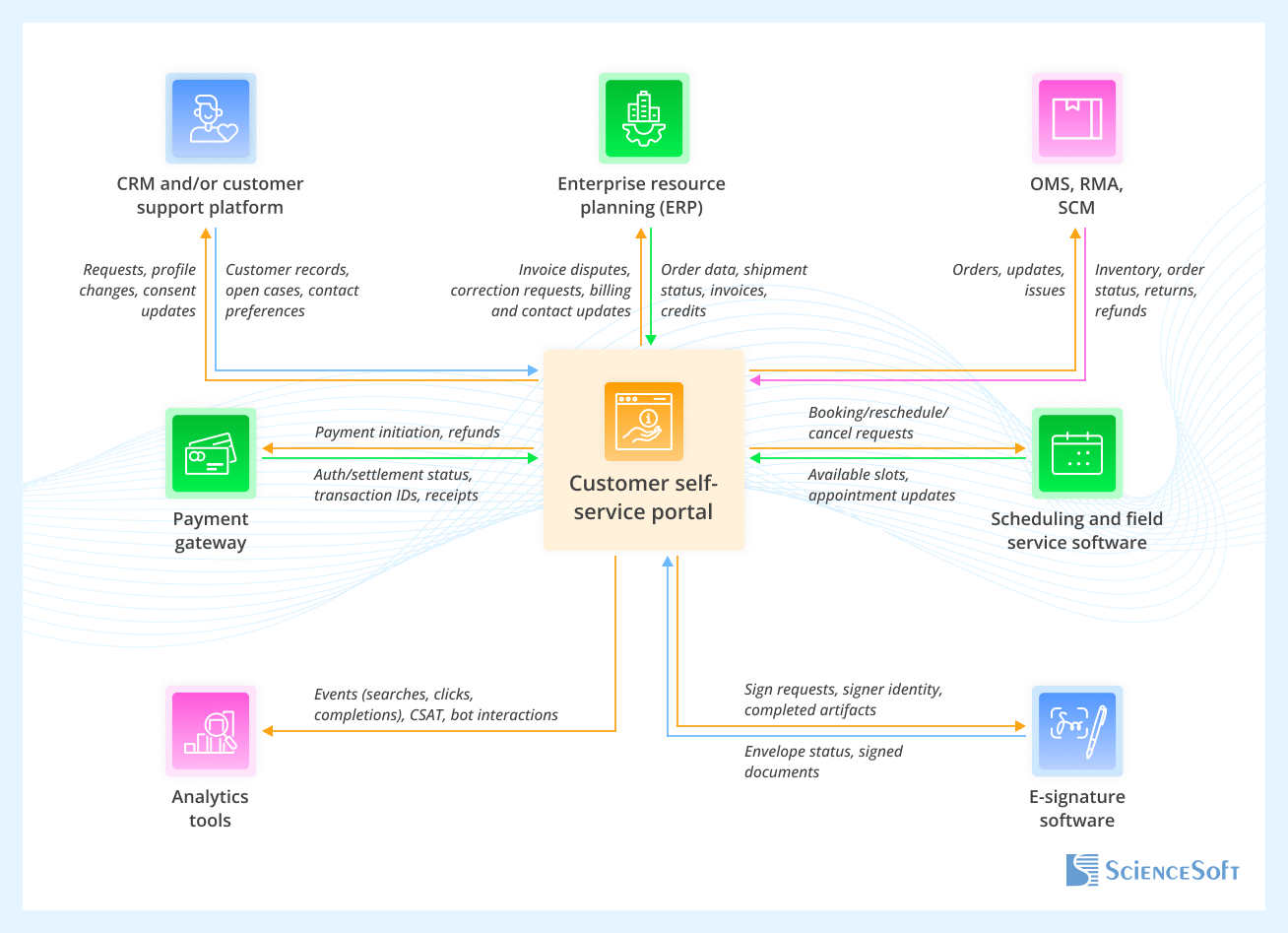
The exact integration map will depend on your existing tech stack and data flows. Below are the most common ones:
- CRM and/or customer support platform integration allows you to keep customer records consistent with the portal to maintain a complete interaction history per customer (orders, requests, messages, questions).
- Enterprise resource planning (ERP) aligns orders, invoices, balances, and entitlements with what customers see in the portal.
- Orders and returns stack (OMS, RMA, SCM) enables self-serve orders, returns, and exchanges with label generation and tracking via the portal.
- Payment gateway handles secure payments and refunds without exposing card data to the portal.
- Scheduling and field service software lets customers book time slots and track appointments via the portal.
- Analytics tools consolidate user activity and performance data from the portal and organize it into convenient dashboards for decision-makers.
- E-signature software enables digital signing and retrieval of contracts via the portal.
Development Tips for a Successful Customer Self-Service Portal

Navigation should drive self-service
ScienceSoft’s UX consultants recommend treating navigation as the top adoption risk: if customers can’t find what they need fast, they’ll go straight to support. Use task-first information architecture (e.g., Account, Orders, Billing), highly visible cross-portal search with quick actions (“Start a return,” “Pay a bill”), and a convenient status hub for orders, appointments, and tickets. On the first login, you can run 30–60s step-by-step guided sequences to get users to quickly perform the action they came for. But keep these tutorials lean: based on ScienceSoft’s experience, heavy front-loaded instructions hurt usability, while targeted guidance (e.g., via interactive tooltips) speeds up adoption. The same goes for content navigation: replace a single, long FAQ page with answers tied to their respective portal section (e.g., all billing answers live in Billing).
Let AI handle the bulk of support requests, but keep human support easily accessible
Most customers want rapid resolution without the need to speak to a representative. At the same time, users tend to distrust or disregard chatbots when it comes to complex issues. ScienceSoft recommends a balanced approach: using RAG and agentic workflows, you can implement a commercial LLM as a context-aware AI assistant. It pulls facts from the portal’s knowledge base, receives account and order details from CRM or ERP, and executes routine tasks independently. However, the AI agent should have a clear pathway for safe handoffs when confidence is low, policy requires human sign-off, or the customer asks to talk to a real person. By directing a case to a human with a short summary of the conversation, the agent still saves both parties time since there is no need for the customer to repeat themselves.
Start with an MVP for quicker payback
From ScienceSoft’s project experience, a full-scale self-service portal with a high degree of customization typically takes 6–12 months to develop. To deliver an MVP in about 3 months, we can use a ready platform (e.g., Dynamics 365 Customer Service) and add custom workflows via low-code tools (e.g., Microsoft Power Apps and Power Pages). Here are some suggestions to speed up the process: anchor the MVP scope to 4–6 high-value user journeys; use low-code tools to automate simple back-end workflows (authenticated forms, case tracking); reserve custom coding for branded portal UX and complex workflows.
Self-Service Portal Development: Cost Estimation
Developing a customer self-service portal usually requires an investment of $40,000–$150,000+, with higher-end builds covering advanced AI, custom interfaces, and complex self-service flows.

$40,000–$70,000
A platform-based portal with custom logic implemented via low-code tools. Includes customer profiles, knowledge base search, simple case or order tracking, request forms, and default UI with light branding.

$70,000–$150,000
A more advanced solution covering core self-service flows (e.g., orders, returns, scheduling, billing); customer service chatbot for Q&A, custom UI elements.

$150,000+
A highly customized portal with custom integration architecture, agentic AI tools, semantic search, and complex billing or supply chain logic. May include a fully branded, unique UI.
Our Clients Say



Harding and Carbone has been very pleased with selecting ScienceSoft as our vendor for developing a client portal for our customers.



The B2B customer portal meets our business needs of enhanced pricing invoicing and contracting and overall client communication. We are fully satisfied with the solution and the assistance of ScienceSoft’s team.

Our collaboration was a true partnership. The team was open, attentive to our requirements and accurate in addressing them. We like the portal’s look and feel and functionality.






Why Build Your Customer Self-Service Portal With ScienceSoft
-
Since 2005, ScienceSoft has been building self-service web portals for customers across healthcare, insurance, and investment.
- In AI development since 1989.
- 8 weeks to build a clickable prototype and 3–4 months to deliver a working self-service portal MVP.
- 750+ IT professionals to cover every project step: discovery, UX/UI design, architecture, coding, integrations, testing, deployment, and post-launch support.
- In-house cybersecurity engineers and compliance consultants to design for security and region-specific privacy regulations from day one.