ScienceSoft Global
 Healthcare
 Insurance
 Investment



Client Collaboration Portals
Features, AI Tools, Integrations, and Costs
With two decades of experience in enterprise portal development, ScienceSoft engineers client collaboration portals that streamline communication, reduce manual document exchange, and enhance transparency and trust.

Client Collaboration Portals in Brief
Client collaboration portals are essential for businesses that manage ongoing client engagements. Shared collaboration hubs help bridge communication gaps, eliminate scattered email exchanges, and provide clients with a secure space to track progress, approve deliverables, and access key documents.
For midsize organizations, custom portal development costs typically start from $40,000 for a low-code build with basic workflows; interactive dashboards, multi-party approval processes, or advanced AI features can bring the investment up to $150,000+. Use our free online calculator to get a cost estimate for your case.
Client Collaboration Portal Features
The features below reflect the options often requested by ScienceSoft’s clients. Every client portal is tailored to the workflows, data sources, and business goals of a specific organization, so your final scope may differ.
Client profiles

Client onboarding
A brief first-login tour introduces clients to key portal areas, shows how to respond to requests and upload documents, and points to help articles or frequent first actions. Short tips then appear as clients discover new areas, so guidance is not front-loaded and does not overwhelm users.

Client profiles
Each client has a dedicated space that brings together key information, documents, and actions. The profile home page highlights priority items, such as pending approvals, new documents, and upcoming deadlines. From there, clients can jump to their active projects, recent requests, and other relevant areas of the portal.

Project workspaces
For each project, matter, or transaction, the portal provides a separate workspace. Documents, action items, and conversation threads stay within that workspace, so activities from different projects are not mixed. Quick navigation tabs lead visitors to items due today, new requests, and recent updates.

Project status and financials tracking
Each project workspace shows real-time project status. Visual cards display task titles, owners, deadlines, and color-coded progress badges (on track, at risk, overdue), helping clients see what’s moving and what’s delayed. The general and per-project finance panels present invoices, retainers, payment status, and contract terms. Clients see upcoming and overdue amounts.

Document hub
Clients can find all key documents in their dedicated hub, including master service agreements, NDAs, billing terms, brand guidelines, and more. The portal surfaces these from the existing system of record (e.g., DMS) to prevent duplication. Each project workspace links to its WIP files and final deliverables, with previews, version history, and activity logs showing who added, edited, and approved each document.

FAQs and knowledge base
A structured library groups articles and answers by topic, with short, scannable steps and links to related requests or documents. While a client is working inside a request form (e.g., uploading files or entering data), a sidebar or expandable panel appears with relevant how-to articles or FAQs. The knowledge base is continuously expanded by content coordinators using insights from client questions and portal analytics.

Flexible payments
The portal supports direct online payments for individual clients through gateways like PayPal and Stripe. Enterprise clients can settle invoices via wire transfers, Automated Clearing House (ACH), and other bank methods, with payment status and receipts tracked in the same place as project and financial information.
Collaboration

Specialized collaboration models
The portal can support various work modes, including legal matters, campaigns, or property portfolios. When a new engagement is created, the account manager can choose a collaboration model that automatically sets up the workspace structure, available actions, form templates, and standard review and approval steps.

Requests and cases
Clients can raise requests or launch pre-configured workflows like adding a new project, document review, approval, or change. Status, assignee, and due date appear on request cards and the home page.

Data forms and lists
Clients can use forms to provide structured input (e.g., briefs, approvals, changes, or budgets). Lists display all submitted items in a live, spreadsheet-style view where both sides can sort, filter, and update details instantly.

Reviews and approvals
Approvals follow a configurable sequence of steps (e.g., internal review, legal review, client sign-off), each with its own due date and reminders. Internal and client users can review WIPs and deliverables directly in the portal.

Conversations in context
Each request, file, or record hosts a discussion with rich text, quote replies, @mentions, and attachments. Comments remain linked to the item they refer to and are visible only to the intended client and internal users, preserving context without exposing unrelated work.

Notifications and reminders
Clients and internal team members can receive alerts about new assignments, comments, deadlines, and status changes directly in the portal or via email, messengers, and other channels. The portal can offer weekly digest emails and quiet-hours settings to reduce noise while keeping critical changes visible.

Meeting scheduler
An in-portal scheduler shows clients open slots based on the connected calendars of their account’s team members. Clients can pick a meeting type, add participants, and attach documents. The portal creates calendar events with video-conference links or meeting room information, sends reminders, and links the meeting to the relevant client account or project workspace.
Portal administration

Security and permissions
Clients and internal users sign in using multi-factor authentication (MFA) and/or single sign-on (SSO) using the company’s existing identity provider. Granular roles and permissions then decide which accounts, projects, and records each user can see or change. Access rules can differ by client, project workspace, or even individual document.

Compliance, auditability, and data retention
Every user action is recorded alongside file versions and approvals. Item history panels, detailed activity logs, and legal-hold flags preserve records and their history for audits. Data retention policies can be applied automatically or configured per project or client to streamline data backup and deletion processes in line with sectoral and jurisdictional regulations.

Analytics and performance reporting
Portal administrators get dashboards with portal adoption and technical performance. They can review user activity by account, common navigation paths, and search effectiveness, as well as uptime, response times, and error trends. The insights help plan content and improvements while keeping all analytics restricted to internal staff.

Workflow automation and routing
Portal admins can configure automation rules in a visual, no-code process builder, choosing how tasks will be routed to the right team, queue, or owner based on client account, request type, and priority. The same rules define due dates, reminders, and approval paths for both employees and clients, so work lands with the right people without manual triage.

Portal page builder
Portal administrators and content managers can use visual page editors to adjust portal content without coding. They can rearrange sections, add widgets, and preview changes safely before publishing, keeping layouts current while preserving branding and client permissions.
How Embedded AI Can Enhance Client Experience and Collaboration on the Portal

Automated document review and checklist completion
Copilots powered by large language models (LLMs) can review submitted documents against standard templates, highlight missing elements, and pre-fill disclosure checklists or compliance summaries for internal teams to validate. Engagement teams spend less time on manual data entry and initial reviews, which speeds up deliverable turnaround.

Smart knowledge retrieval
An intelligent search assistant can extract intent even from unclear client requests to suggest the most relevant guidance. Summarized search results open in a widget beside the client’s current task for immediate use. The knowledge base is continuously expanded by content coordinators using insights from client questions and portal analytics, accelerated by AI drafting and auto-tagging.

AI-assisted content preparation for deliverables
For proposals, project summaries, or client reports, AI assists with structuring, formatting, and summarizing content using approved templates. It highlights inconsistencies and suggests client-ready phrasing while preserving the firm’s tone and citation rules. Employees can access it directly in the document editor, where a dedicated panel provides inline suggestions and quick-apply formatting options.

Conversational client assistant
An in-page client assistant can give users hints, propose next steps, cite relevant articles, and summarize long documents into action points so clients complete tasks faster without leaving the form or workspace. Widgets or suggestions appear contextually (e.g., “Need help uploading a document?” or “Here’s our approval checklist”) and are triggered based on the client's current step.
Integration Map for Client Collaboration Portals
These are the core software integrations that greatly increase the efficiency of collaboration portals. However, your integration map may differ, as it will be tailored to connect with the specific tools you use.
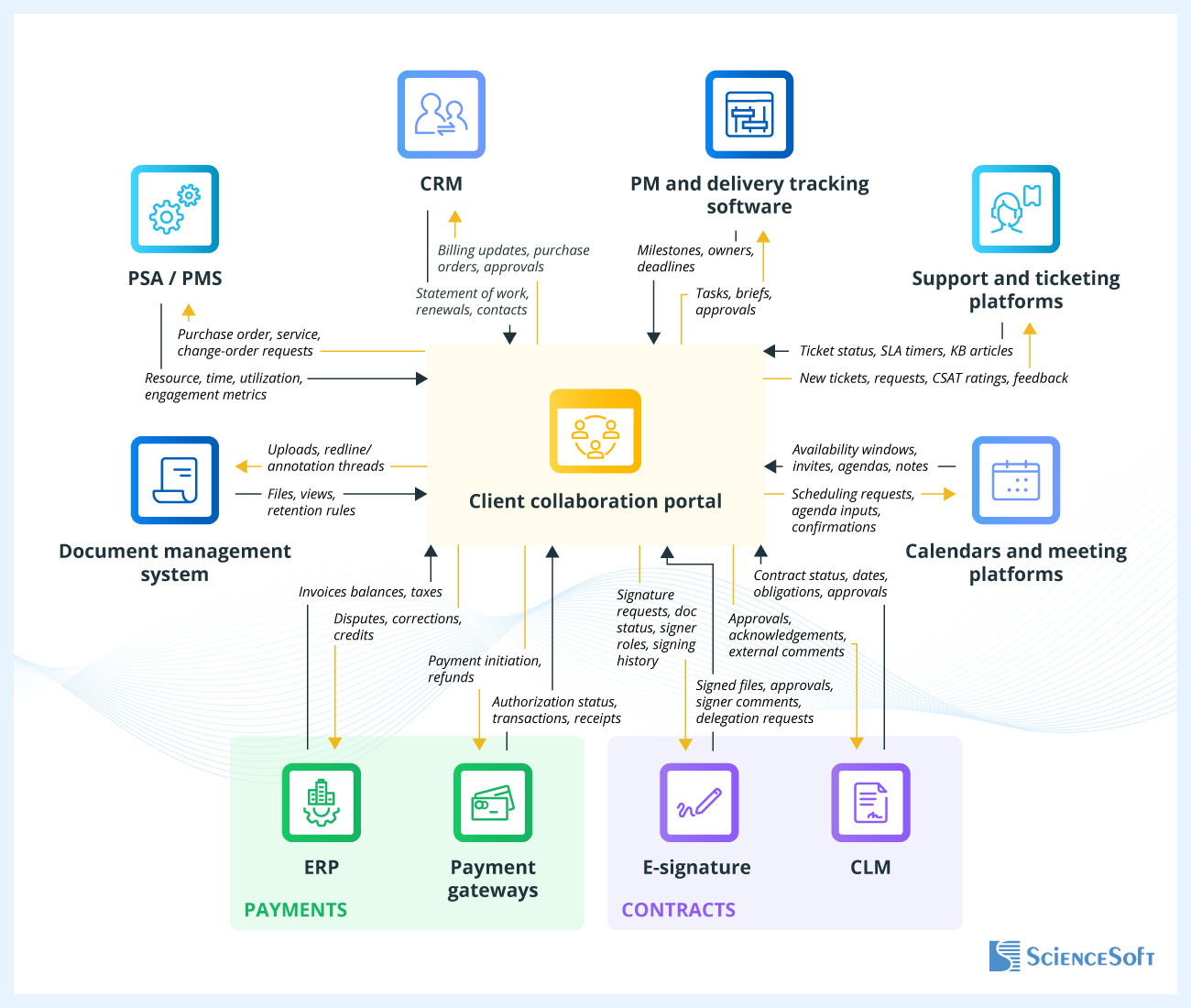
- Customer relationship management (CRM) – reflects verified account hierarchies, contacts, and agreed terms so client workspaces show the right stakeholders and entitlements.
- Project management and delivery tracking software – exposes simplified project views (milestones, status, upcoming work) to the portal without revealing internal backlogs.
- Professional services automation (PSA) / practice management system (PMS) – lets clients see who’s working on their projects, time spent, and utilization patterns tied directly to logged work and approved timesheets.
- Document management system – integration with DMS enables internal teams and clients to collaborate on documents within the portal while the DMS remains the system of record.
- ERP – a portal can connect to billing or ERP systems so clients can view invoices, payment status, and account balances.
- Payment gateways – integration with payment gateways can be added to let individual clients pay for services online.
- E-signature – an integrated e-signing tool coordinates signature envelopes with the portal and reflects approval status.
- Contract lifecycle management (CLM) – full CLM integration (e.g., clause library, redlining, obligation tracking) is a good idea when contract authoring and negotiation are key parts of the collaboration workflow, as well as post-signature governance. The portal provides a client view and access to sealed files.
- Support and ticketing platforms – customer service tools align client questions and incidents with internal queues and SLAs.
- Calendars and meeting platforms – calendar integrations (Microsoft 365, Google Workspace) make scheduling and meeting preparation effortless and tie discussions to work items.
Client Collaboration Portal Development: Best Practices
Drawing on ScienceSoft’s experience in building client collaboration solutions across industries, our consultants share their field-tested recommendations. These practices aim to reduce project risks, enable rapid adoption across diverse client bases, and keep the portal’s TCO predictable.
Focusing the MVP on measurable collaboration value
Start with the functions that directly improve client communication and visibility: shared workspaces, project or shipment tracking, document exchange, and real-time status updates. Launching an MVP around these essential workflows helps confirm portal value early and provides a foundation for expanding into nice-to-have self-service features later. A lean portal MVP with basic capabilities can be delivered this way in 2–3 months.
Using RAG to add context-aware AI assistants at a lower cost
You can “teach” commercial large language models (LLMs) like GPT or Claude to use your corporate knowledge when answering user queries through retrieval-augmented generation (RAG). With RAG, the model retrieves relevant content from approved internal sources such as reports, contracts, and specifications at runtime instead of being retrained on your data, which is faster and significantly cheaper than full model retraining or fine-tuning. Proper guardrails ensure that only documents a user is allowed to see are retrieved, and sensitive data is not sent to public models or exposed to unauthorized users.
Enabling a smooth mobile experience without a dedicated app
ScienceSoft advises designing the portal so that the same web UI works well on phones and tablets, without a separate mobile app. Responsive layouts, touch-friendly controls, and task-focused mobile views make it easy to review documents, approve items, or check statuses on a smaller screen. Where helpful, the portal can be installed as a shortcut on a mobile home screen and opened in full-screen mode, providing an app-like experience with a single codebase.
Using low-code for back-office portal components
Low-code platforms, such as Microsoft Power Apps, can be used as an alternative to more expensive custom development to automate internal administration, content management, and approval workflows that require frequent adjustments. However, ScienceSoft’s engineers recommend custom development for client-facing interfaces where responsiveness, complex data visualization, or brand fidelity are key. This approach keeps the client experience polished while maintaining flexibility and cost efficiency at the back end.
Client Collaboration Portals: Cost Estimation
Drawing on ScienceSoft’s experience delivering portals for professional services, costs for client collaboration solutions range $40,000 – $150,000.

~$40,000–$70,000
A platform-based (e.g., SharePoint) portal with key MVP elements: shared project views, document submission forms, and project status updates. Unique workflows are enabled via low-code tools.

~$70,000–$100,000+
Moderate customization allows for adding tailored business logic or UI components. Users can co-edit documents, make in-portal payments, put e-signatures, and more.

$150,000+
A full-scale portal that supports multiple corporate and third-party integrations (incl. legacy software), highly complex workflows and approval logic, fully branded UI, and assistive AI capabilities.
Our Clients Say



We commissioned ScienceSoft to build a Dynamics 365 customer portal to help our sales team streamline communication with B2B customers. The B2B customer portal meets our business needs of enhanced pricing invoicing and contracting and overall client communication. We are fully satisfied with the solution and the assistance of ScienceSoft’s team.

Harding and Carbone has been very pleased with selecting ScienceSoft as a web app development company for developing a web portal for our customers. Their professionalism, expertise, guidance, organization, and timing has been wonderful. They were also very patient with explaining their process and the next steps if we ran into any issues that we did not understand.



We teamed up with ScienceSoft trusting a solid experience that the company had in the domain of web portal development, and never regretted the decision. ScienceSoft’s team proved to be knowledgeable, thoughtful, and highly motivated.


Why Build Your Client Collaboration Portal With ScienceSoft
- 21 years of experience in end-to-end web portal delivery.
- 37 years of experience in AI enablement.
- 1,900+ successful web development projects in our portfolio.
- Long-standing Microsoft partner for SharePoint and Microsoft 365, and a registered ServiceNow partner.
- In-house Project Management Office (PMO) and 45+ project managers with PMP, CSM, PSM, PSPO certifications to ensure predictable delivery of web portal projects.
- 240+ web developers, over 50% of whom are senior and lead specialists.
- In-house compliance consultants proficient in jurisdictional (CCPA, GDPR, PDPL) and sectoral (HIPAA, GLBA, PCI DSS, SOX, GxP) standards and regulations.